

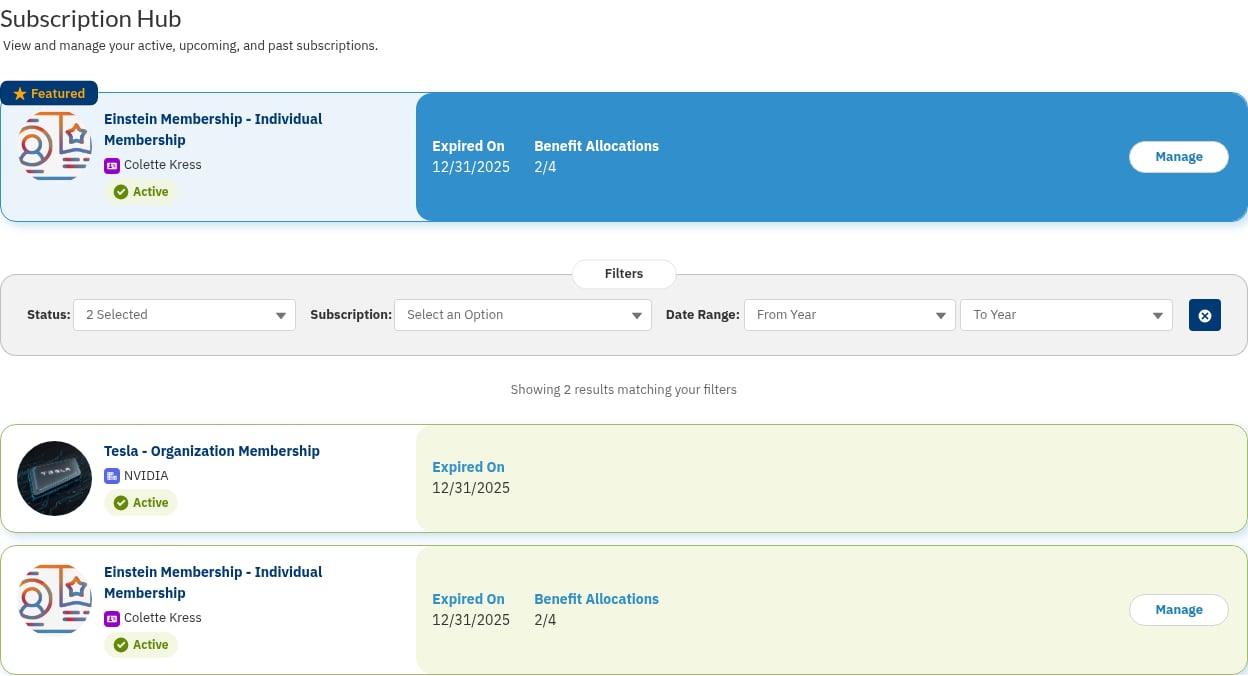
The Subscription Hub as a logged-in member sees it
fs_portal_* Lightning web components, FS_PORTAL_* Apex, no namespace prefix). Because they are unmanaged, you can customize them — but always clone a component before changing it so that package upgrades do not overwrite your edits.
What the Hub Shows
The Subscription Hub component (fs_portal_subscriptionHub) lists the subscriptions a contact is allowed to see, with a card for each one. Each card links to the relevant action — Manage, Renew, Manage Benefits, or Cancel — and those actions are themselves rendered by companion components such as fs_portal_manageSubscription and fs_portal_renewSubscription.
Two settings on each subscription Product2 record govern what a member can do:
- Subscription Visibility (
FS_PORTAL_Subscription_Visibility__c) — a multi-select picklist that controls who sees a subscription in the hub. Options include Subscription Contact, Billing Contact, Primary Contact, Organization Contacts, Child Account Contacts, and Benefit Allocation Contacts. - Manage Subscription (
FS_PORTAL_Manage_Subscription__c) — a multi-select picklist with the same options that controls who may manage a subscription (including managing its benefit allocations).
FCORE_MEM__Is_Subscription__c = TRUE) appear in the hub.
Working with the Subscription Hub
Setting Up the Subscription Hub
Place the hub and its companion components on your portal pages and configure each subscription product’s visibility and management settings.
Managing and Renewing Subscriptions in Subscription Hub
How a portal user views, manages, and renews their subscriptions from the hub.
Managing Benefit Allocations for Subscription Hub
How a portal user allocates a subscription’s benefits to other contacts on their account.
Manage Benefits Page
Place the Manage Benefits page that members reach from the hub to allocate their benefits.
Cancel Subscription
Set up the portal flow that lets a member cancel an active subscription.