

Overview
The Subscription Cancellation feature lets staff and portal users cancel a subscription so it will not renew. You can cancel from a quick action on the Purchase Activity record, or a member can cancel from the portal.How Cancellation Works
Cancelling a subscription stops it from renewing — it does not end the member’s current access (to do that, see Ending a Subscription Immediately). fusionCore supports one cancellation type, Cancel Renewal. When you cancel, fusionCore marks the Purchase Activity (FCORE_PAY__Purchase_Activity__c):
If a renewal Order was already generated for the subscription, cancelling also deletes it — so the customer isn’t billed for a renewal they cancelled — removing, in order: any pending installment Financial Event lines, the now-empty Financial Events, the renewal Order Product, and finally the renewal Order itself.
Cancellation as a Staff User
How to cancel a subscription from Salesforce.1
Open the Purchase Activity
Open the Purchase Activity record for the subscription you want to cancel.
2
Click Cancel Subscription
Click Cancel Subscription.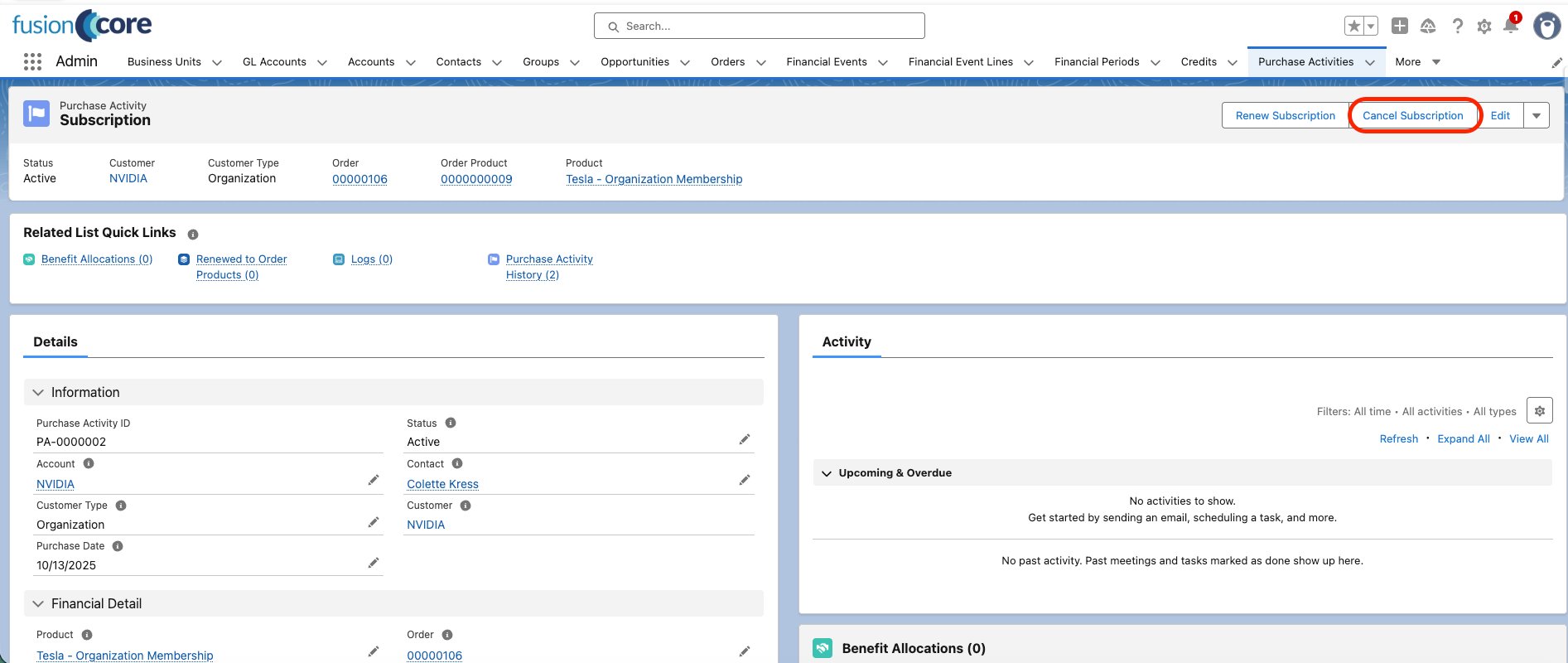
3
Confirm
In the confirmation modal, click Confirm.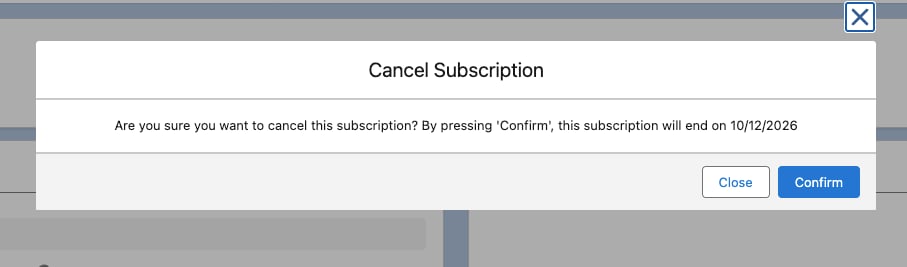
The member keeps access to their subscription features until the
End_Date__c passes. Cancelling only stops the subscription from renewing — it does not end access immediately.Cancellation as a Portal User
Members can cancel their own subscription from the portal. This self-service flow is provided by the fusionCore Portal Components package and runs on an Experience Cloud page. To place and configure the portal component, see Cancel Subscription.1
Open the Portal Cancel Subscription URL
On the Purchase Activity record, open the Portal Cancel Subscription URL (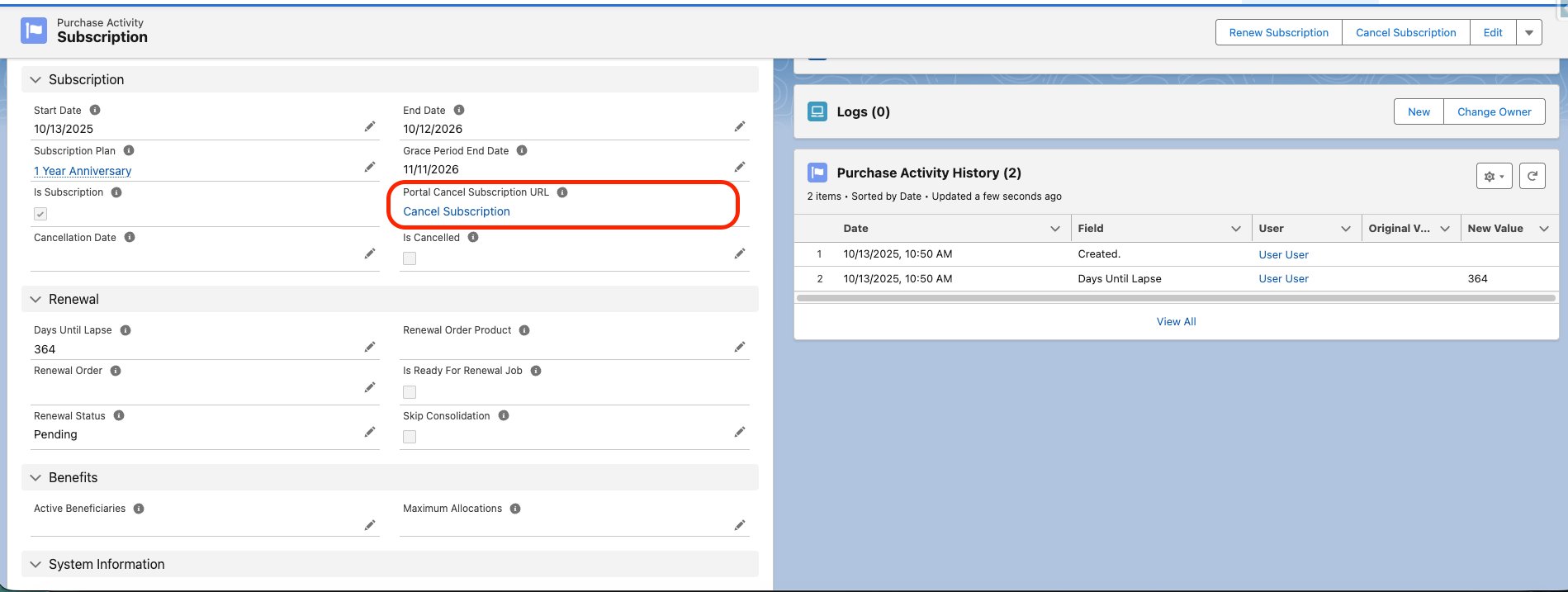
FS_Portal_Cancel_Subscription_URL__c) — a formula link to the member’s portal cancellation page. You can also surface this field in the portal using Roster Settings.The link only appears when the subscription is still active (not already cancelled) and the Purchase Activity’s Business Unit has both a Portal URL and a Portal Cancel Subscription Page Path (
FS_Portal_Cancel_Subscription_Page_Path__c) configured. If either Business Unit field is missing, the field is blank with no error.2
Cancel in the portal
On the portal cancellation page, the member clicks Cancel Membership.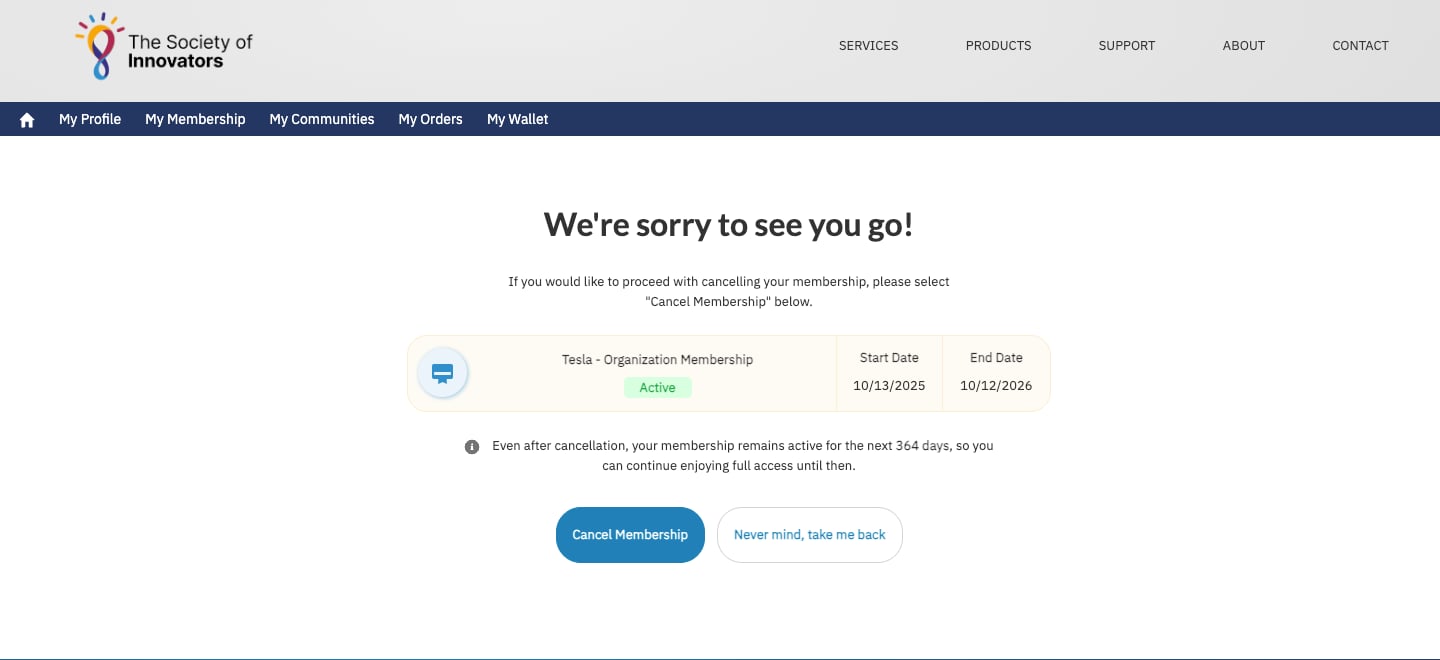
Who can cancel from the portal. By default, only the contact who holds the subscription (the Purchase Activity’s contact) can cancel it. For organization subscriptions, an administrator can additionally allow the account’s Billing Contact or Primary Contact to cancel by turning on the
FS_Billing_Contact_Can_Cancel_Org_Subs or FS_Primary_Contact_Can_Cancel_Org_Subs Constant — both ship turned off. A member who isn’t eligible sees “You’re not eligible to cancel this subscription.”Ending a Subscription Immediately
Cancellation alone leaves the current active membership access in place until the paid-through date. To end a subscription right away:1
Cancel the subscription
Cancel the Purchase Activity as a staff user or a portal user, using the steps above.
2
Set the End Date to today
Set
End_Date__c to the current date.Setting
End_Date__c to today removes the customer’s access to their subscription features.Limitations and Common Pitfalls
- Only the Cancel Renewal type is implemented.
CancelSubscriptionEHhandles only the Cancel Renewal action. Any other cancellation type is silently ignored — nothing happens and no error is raised. - Deletions are irreversible. Cancellation hard-deletes the generated renewal Order, Order Product, and pending installment Financial Events. They bypass the Recycle Bin and cannot be recovered.
- The grace window is removed. Cancellation overwrites
Grace_Period_End_Date__cwithEnd_Date__c, so any remaining grace period after the paid-through date is dropped. - Partial failures can leave orphans. During cancellation fusionCore disables the
OrderPendingPaymentVTUandOrderItemPendingPaymentVTUvalidations. If part of the delete sequence fails, the error is logged rather than thrown, which can leave orphaned renewal records behind. Spot-check the renewal Order after cancelling a subscription that already had a renewal generated.