

Overview
A subscription Purchase Activity is aFCORE_PAY__Purchase_Activity__c record with the Record Type FC_Subscription. It is linked to a Subscription_Plan__c, and it carries the start date, paid-through date, and renewal fields that drive a subscription’s lifecycle.
fusionCore creates a subscription Purchase Activity automatically when you activate an Order that contains a subscription product. You do not create one by hand.
How to Create a Subscription Purchase Activity
Prerequisites
- An Order that contains a subscription product.
- That product must have Purchase Activity Creation set to True.
1
Open the Order
Open the Order that contains your subscription product.
2
Activate the Order
Activate the Order in one of two ways: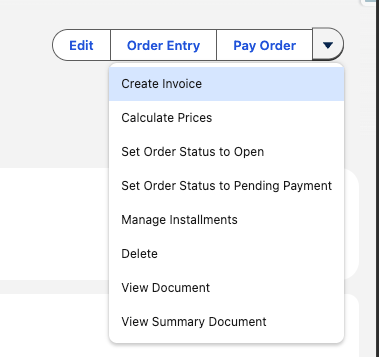
- Take a payment (full or partial) on the Order, or
- On the Order detail page, click Create Invoice.
3
Confirm the Purchase Activity
fusionCore creates the subscription Purchase Activity and links it to the Subscription Plan. Open it from the Order or from the related Account or Contact.
The status of the Purchase Activity depends on the subscription’s start date. If the start date is in the future, the status is Pending. Otherwise, the status is Active.
Key Fields on a Subscription Purchase Activity
These are the fields you read most often on a subscription Purchase Activity.Is_Subscription__c is a formula field that copies the product’s Is Subscription flag. You cannot edit it directly. If the product’s flag is not set, the record is not treated as a subscription and renewals will not run for it.Working with Subscription Purchase Activities
Subscription Renewal
How the nightly job generates renewal Orders for subscriptions that are due.
Subscription Cancellation
How to stop a subscription from renewing and what fusionCore cleans up.
Membership Info on Account and Contact
The membership fields that roll up to the Account and Contact.
Advanced Joins
Let members joining late in a Calendar term roll into the next full term.