

Overview
When a member buys a membership, fusionCore copies the key membership details onto the related Account (for organization memberships) or Contact (for individual memberships). This gives you an at-a-glance view of someone’s membership without opening their Purchase Activities. These fields are filled in automatically. A trigger unit,PurchaseActivityMembershipTrackingTU, rolls the current membership up from the member’s membership Purchase Activities. You do not edit these fields by hand.
For a membership Purchase Activity to feed these fields, its product must have both Is Membership and Is Subscription checked.
How a Membership Reaches the Account or Contact
Prerequisites
- A subscription product with both Is Membership and Is Subscription checked. To set up a product, see Subscription Products.
- An Order that contains that product.
1
Add the membership product to an Order
On the Order, add the subscription product that has Is Membership checked.
2
Activate the Order
Activate the Order by taking a payment or by clicking Create Invoice. This creates the membership Purchase Activity.
3
See the membership on the Account or Contact
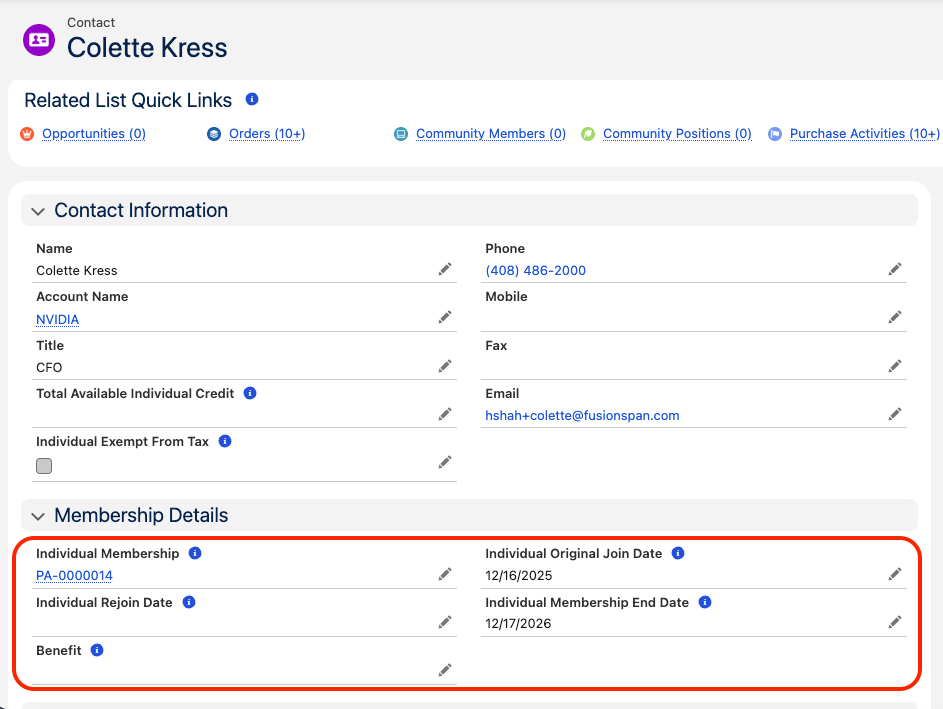
The membership details appear automatically on the Account (organization memberships) or Contact (individual memberships).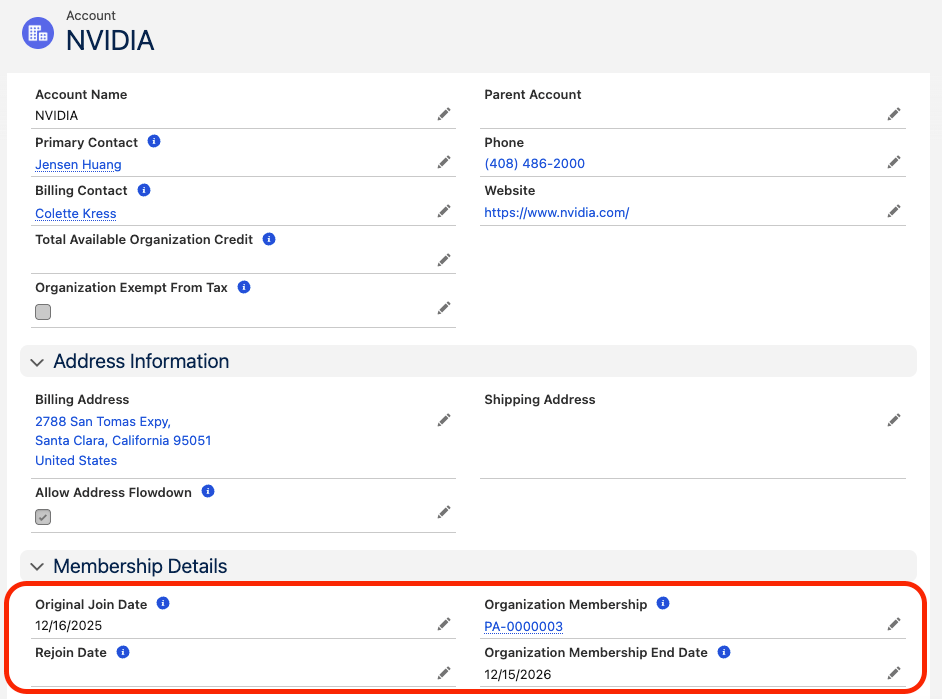
How the Fields Are Populated
The trigger unit looks at the member’s child Purchase Activities where the product hasIs_Membership__c = TRUE, the record is a subscription, and FCORE_PAY__Status__c is Active or Pending. From those, it sets:
- Current membership — the Active Purchase Activity, written to the membership lookup field.
- Membership end date — the furthest paid-through date across the Active and any Pending Purchase Activities.
- Original Join Date — set from the first membership’s
Start_Date__c. - Rejoin Date — set instead of Original Join Date when the prior linked membership had Expired, marking a return after a lapse.
Membership Fields on the Contact
Membership Fields on the Account
Limitations and Common Pitfalls
- The product must have both
Is_Membership__candIs_Subscription__cchecked. A membership-only product without the subscription flag does not populate these fields. - Only Active and Pending Purchase Activities count. An Expired membership on its own does not populate the membership lookup — it only triggers a Rejoin Date the next time the member joins.
- The trigger unit only reacts when a Purchase Activity is new or when its
FCORE_PAY__Status__corEnd_Date__cchanges. Other edits do not refresh these fields. - These fields are written by automation. Do not edit them by hand.
- The trigger unit runs without sharing, and failures are logged rather than surfaced to you. If a membership does not appear, check the Purchase Activity’s status and the product’s flags first.