

Overview
The nightly renewal job runs theSubscriptionRenewalBatch Apex class. It finds every eligible subscription, groups the work by customer, and generates renewal Orders for the next term. The job runs as FC: Generate Renewal Orders and uses the default schedule 0 0 3 * * ? (3 AM every day) unless you set your own.
You schedule the job once. After that it runs on its own every night.
Prerequisites
- You have the System Administrator profile, or a permission set that grants access to Setup and the ability to run anonymous Apex.
- The
SubscriptionRenewalBatchclass is deployed in your org (it ships with the Subscriptions package).
How to Schedule the Renewal Batch Job
You can schedule the job from the Salesforce Setup menu without writing any code.1
Open Setup
Click the gear icon at the top-right of Salesforce, then click Setup. The gear icon opens the administration menu.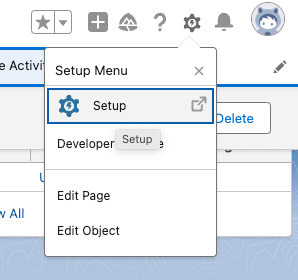
2
Find Apex Classes
In the Quick Find search box, type 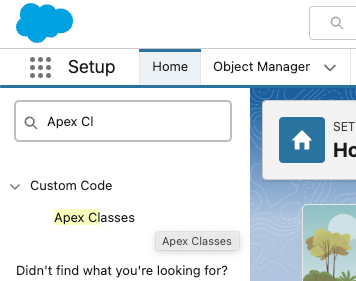
Apex Classes, then click Apex Classes. Quick Find is the search box on the left side of the Setup page.3
Open Schedule Apex
On the Apex Classes list view, click Schedule Apex.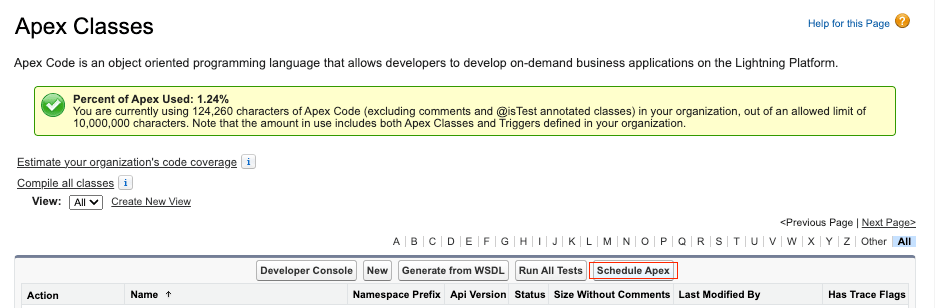
4
Fill in the schedule
Complete the scheduled job details: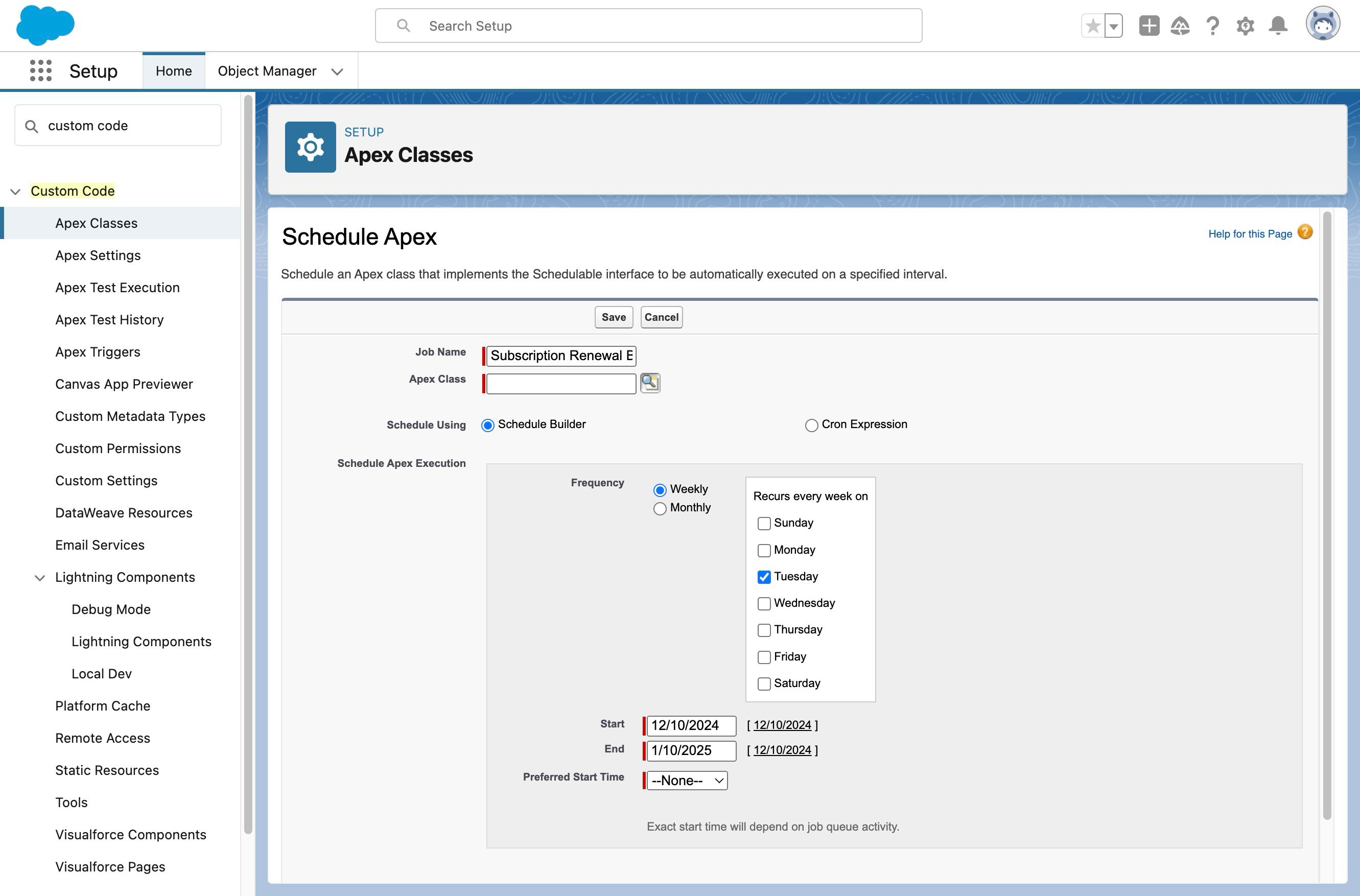
- Give the job a name, for example
FC: Generate Renewal Orders. - For Apex Class, select
SubscriptionRenewalBatch. - Set the job to run Weekly on every day, or set the frequency your org needs.
- Set a Start and End date and a Preferred Start Time (3 AM matches the package default).
5
Save
Click Save.
6
Verify the job was created
In Quick Find, type 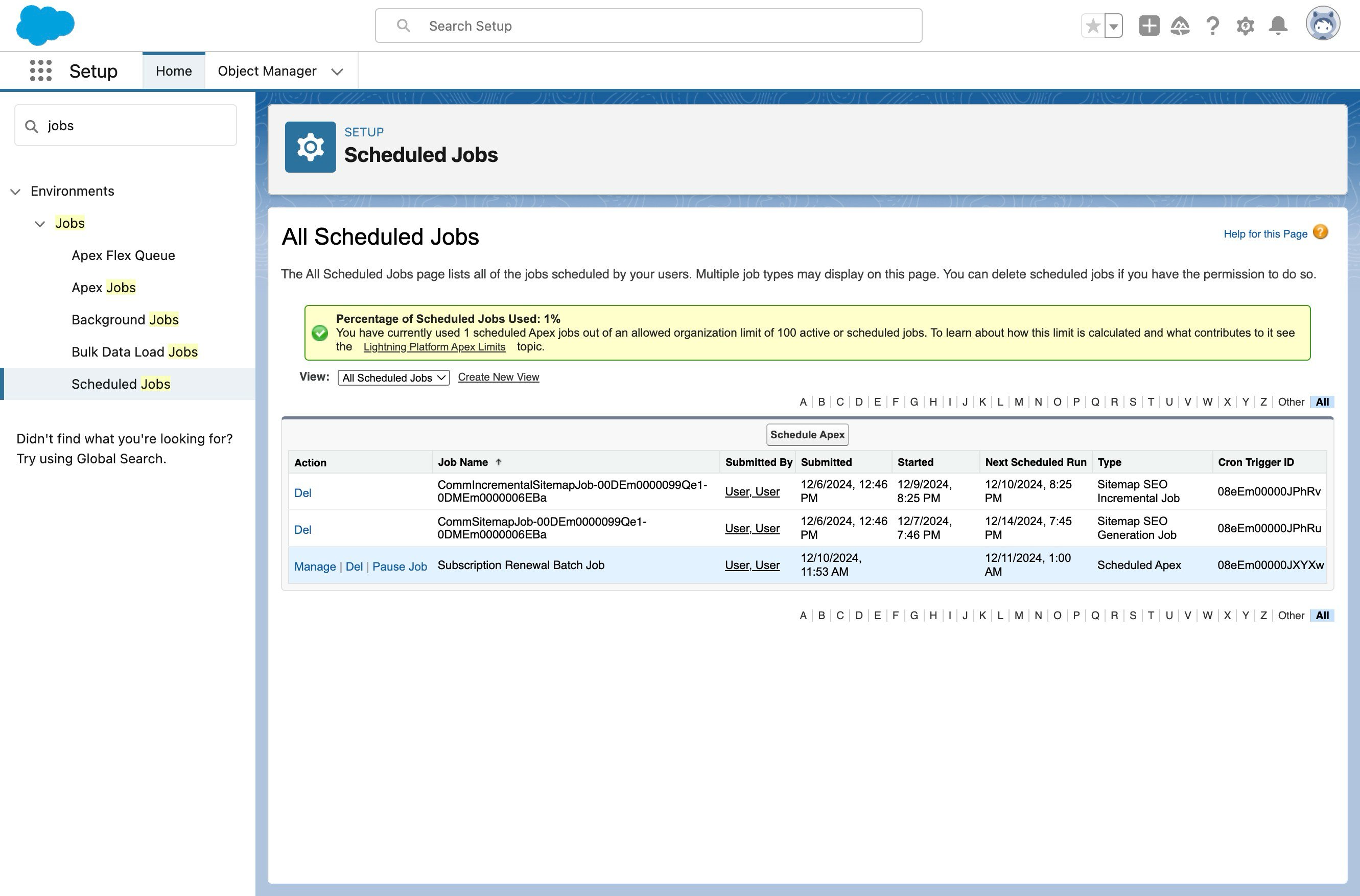
Scheduled Jobs, then click Scheduled Jobs. Your newly scheduled job appears in the list.How to Schedule the Job With Apex Code
If you want a custom run time, you can schedule the job from anonymous Apex instead. The class exposes two schedule methods.1
Schedule with the default timing
Run 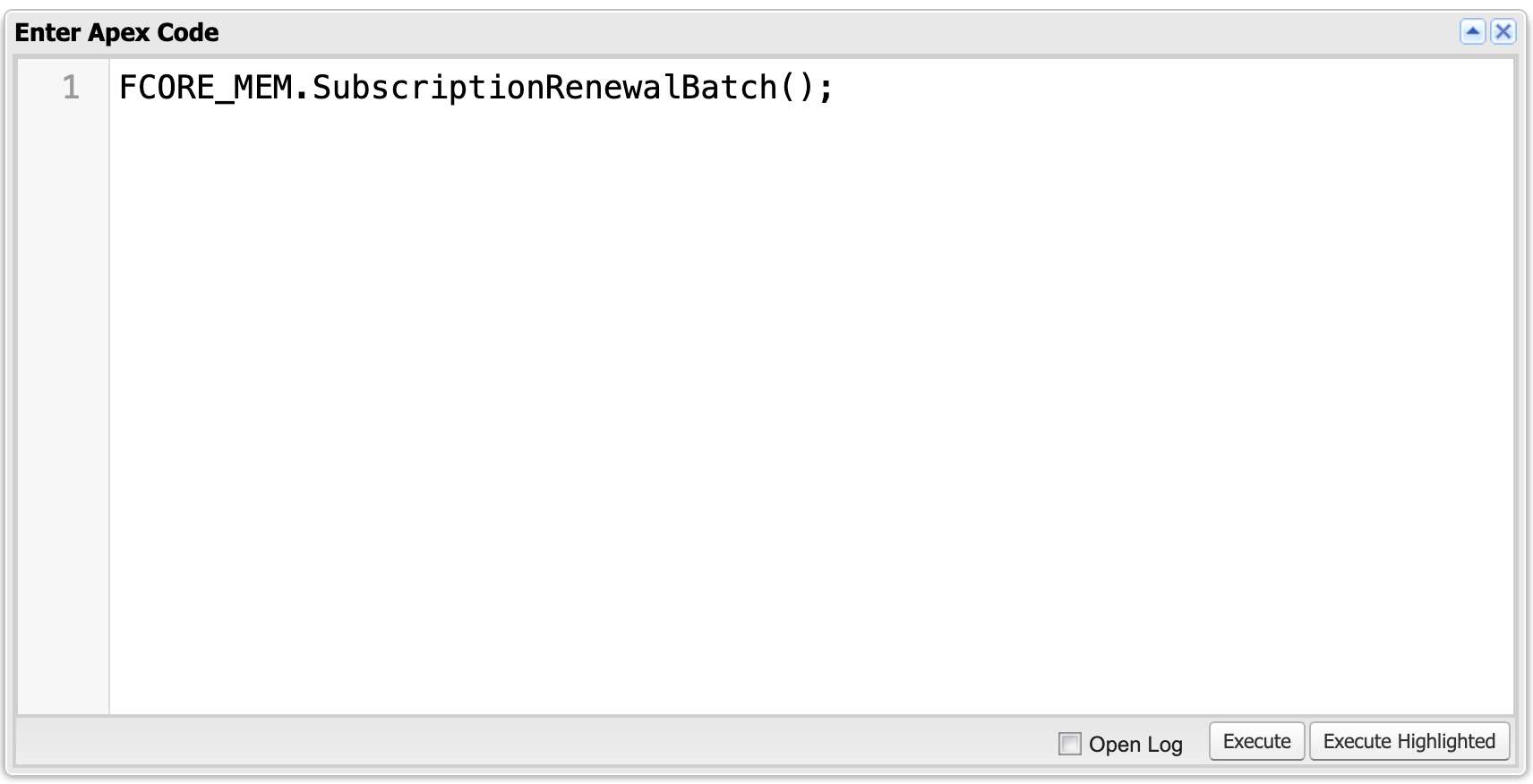
SubscriptionRenewalBatch.schedule(); with no argument to use the default 3 AM daily schedule.2
Schedule with a custom cron expression
To choose your own run time, pass a cron expression to 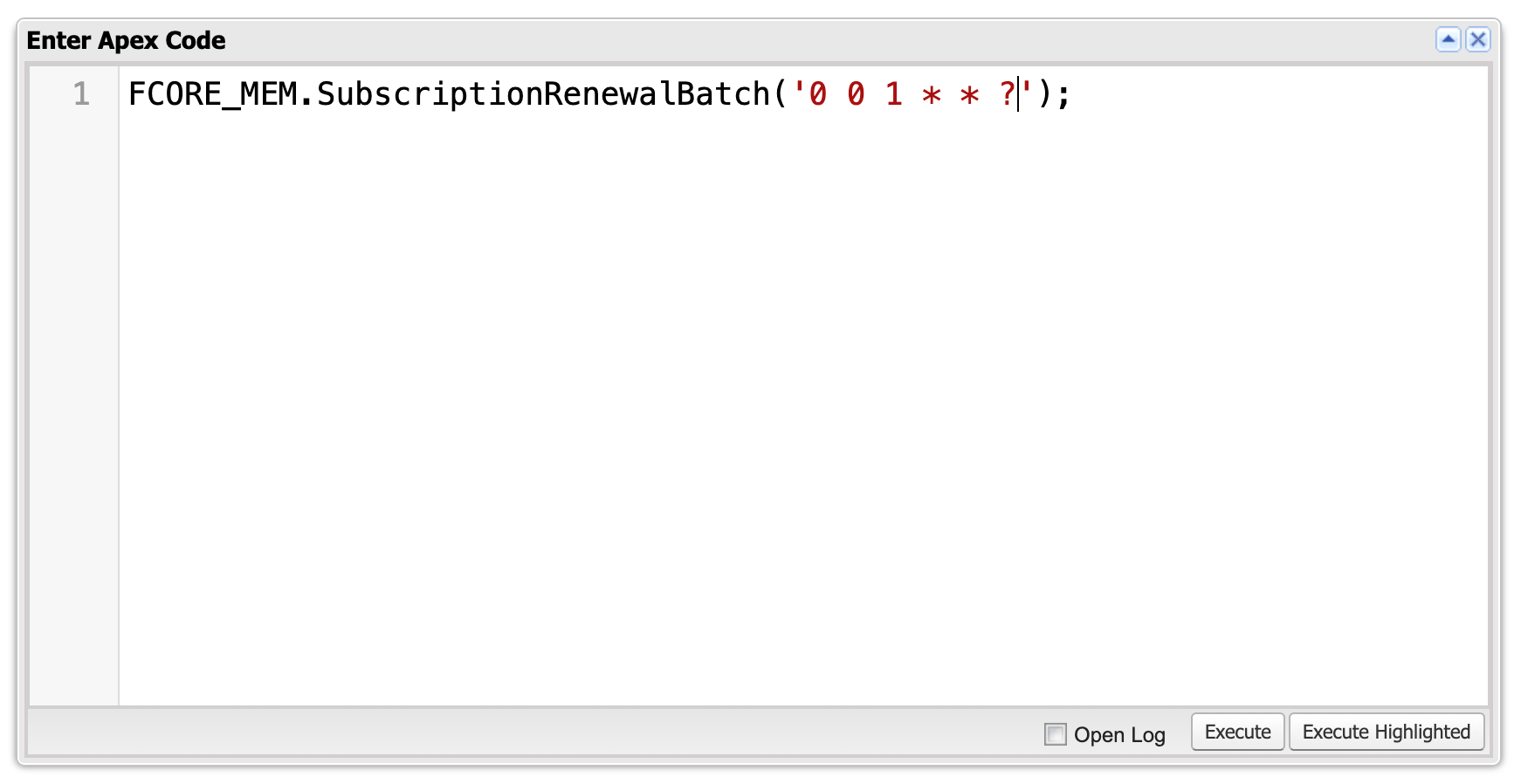
SubscriptionRenewalBatch.schedule(String cron).0 0 1 * * ? runs the job every day at 1 AM. A cron expression is the standard Salesforce way to describe a recurring schedule.Tuning the Batch Size
The job processes Purchase Activities in batches. You control how many records each batch handles with a Constant record namedFS_Subscription_Renewal_Batch_Job_Size (FCORE_BASE__Constant__mdt). A Constant is a fusionCore configuration record that holds a single setting value.
If you do not create this Constant, the batch uses a default size of 200 records per batch. Lower the value if a renewal run hits Salesforce processing limits; raise it to process more records per batch.
What Makes a Purchase Activity Eligible
The batch only selects Purchase Activities where theIs_Ready_For_Renewal_Job__c checkbox is true. That checkbox is a formula, so you cannot edit it directly. It evaluates to true only when all of these conditions are met:
- The subscription is not cancelled.
Renewal_Days__con the Subscription Plan is not blank.Days_Until_Lapse__cis not blank and is less than or equal toRenewal_Days__c.- The product has
Is_Subscription__cset to true. FCORE_PAY__Status__cisActiveorExpired.Renewal_Order__cis blank (no renewal Order has been generated yet).- The product is not flagged
Is_Not_Renewable__c. Renewal_Status__cisPending.
Renewal_Days__c field on the Subscription Plan controls how many days before the expiration date renewals are generated. For example, set Renewal_Days__c to 30 to start generating renewal Orders 30 days before a subscription’s End_Date__c.
Important notes
- If
Is_Ready_For_Renewal_Job__cis not true, the Purchase Activity is not picked up by the batch job. - The batch consolidates multiple Purchase Activities for the same customer into a single renewal Order. If you check
Skip_Consolidation__con a Purchase Activity, it is processed separately during renewal, even when other grouping conditions match.
Limitations and Common Pitfalls
- The renewal engine guards against ineligible records. If a Purchase Activity is fed to renewal with an existing renewal Order, the wrong status,
Renewal_Status__cset toDo Not Renew, a status that is notPending, a non-subscription product, or a product flaggedIs_Not_Renewable__c, the renewal is rejected. Use the eligibility conditions above to predict what the batch will pick up. - Consolidation can merge subscriptions you expected to keep separate. The batch groups multiple Purchase Activities per customer into one renewal Order unless they differ on customer,
End_Date__c,Renewal_Days__c,Auto_Charge__c, or wallet item — or unlessSkip_Consolidation__cis checked. CheckSkip_Consolidation__cwhen you need a Purchase Activity renewed on its own Order. - A failing batch retries with a smaller batch size. If a batch run fails, the job halves the batch size and retries, down to a size of 1, to isolate the problem record. A single bad record will not stop the rest of your renewals.
- The job runs in system mode and without sharing. The batch ignores record sharing rules and runs with full access, so it renews subscriptions regardless of who owns them.
- A missing default Subscription Plan stops renewal. If a product has no default Product Subscription Plan, renewal fails with
Default_Subscription_Plan_Is_Missing_V2. Make sure each renewable product has exactly one default plan.