

Converting an Opportunity to an Order
The Convert To Order quick action opens a guided modal that turns a qualified Opportunity into an Order. The Opportunity is not deleted — it is marked as converted, and the new Order links back to it.Before You Start
The Opportunity must meet all of the following, or the conversion errors out:- It has an Account.
- It has a Billing Contact (
Billing_Contact__c). - It has a Customer Type (
Customer_Type__c) of Organization or Individual. - It has at least one product.
- Used By fusionCore (
Used_By_FusionCore__c) is checked. - It has not already been converted (
Converted_To_Order__c).
1
Open a qualified Opportunity
Navigate to an Opportunity that has products and meets the prerequisites above. Confirm the Opportunity Information is filled out.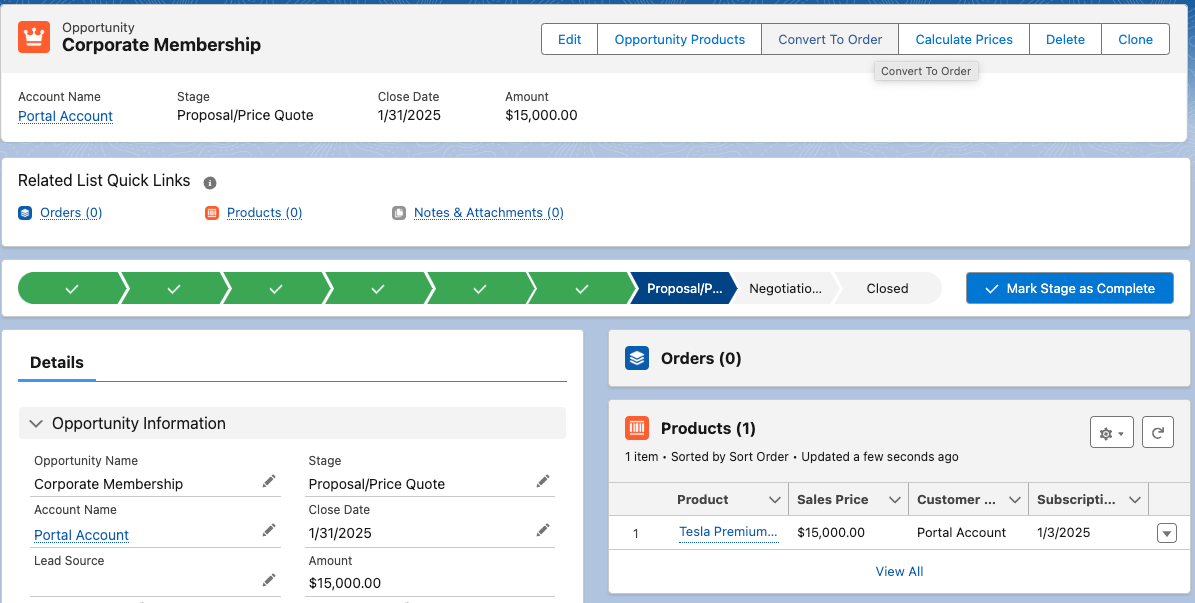
2
Click Convert To Order
At the top right of the Opportunity page, click Convert To Order. A guided modal opens.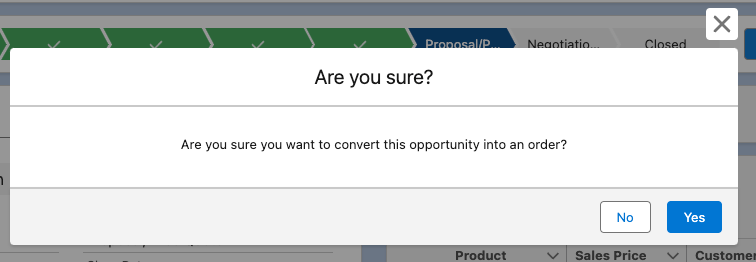
3
Choose a Business Unit if prompted
The Business Unit comes from the products on the Opportunity. If more than one Business Unit could apply, the modal prompts you to pick one. Otherwise, this step is skipped.
4
Land on the new Order
On success, fusionCore creates the Order and takes you to its Order Entry screen. The original Opportunity stays in place, marked as converted, with a link to the new Order.
The Opportunity’s stage moves to Closed Won when its linked Order reaches Payment Received status.
Limitations and Common Pitfalls
- All prerequisites must be met. The conversion fails if the Opportunity is missing an Account, a Billing Contact, a Customer Type, or at least one product; if Used By fusionCore is unchecked; or if it has already been converted.
- Customer Type is a restricted picklist.
Customer_Type__caccepts only Organization or Individual, and it must be set before conversion. - Business Unit comes from the products. It is not a field on the Opportunity. When products span more than one Business Unit, you must choose which one applies during the conversion.
- The Opportunity is not deleted. Conversion marks it as converted and links it to the new Order, rather than removing it.