

Creating a New Opportunity Record
A fusionCore Opportunity is the standard SalesforceOpportunity extended with custom fields. When you create one with an Account, fusionCore can automatically fill in the Primary Contact and Billing Contact for you.
1
Open the Opportunities list
Click the App Launcher and search for Opportunities. The App Launcher is the grid of nine dots in the top-left of Salesforce that you use to find apps and records.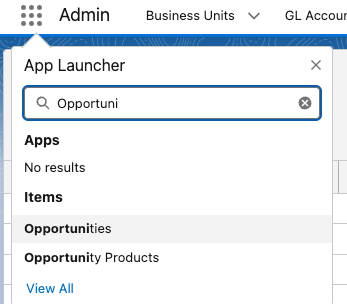
2
Start a new Opportunity
At the top right of the Opportunities list, click New.
3
Fill out the Opportunity information
Enter the Opportunity Information: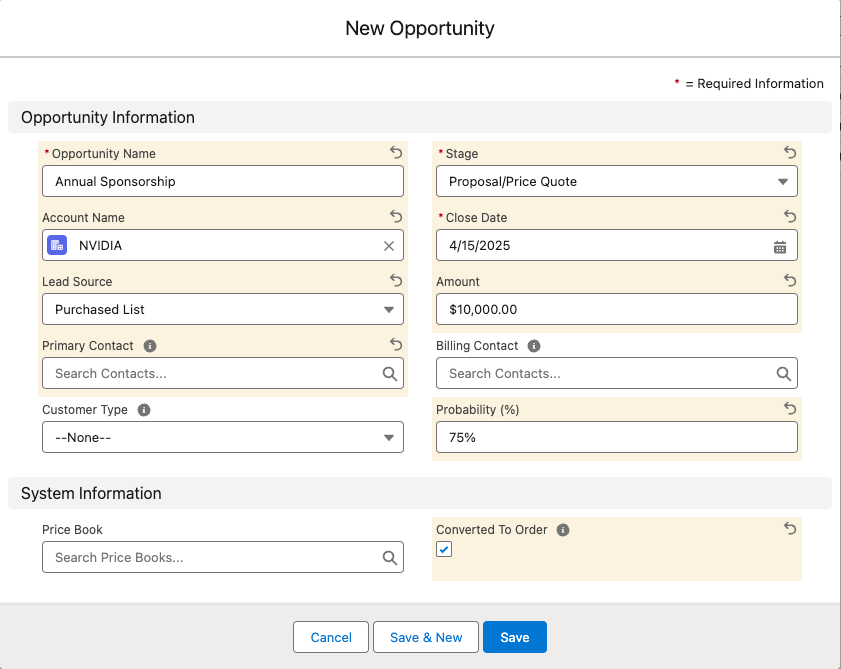
- Set the Account — this is required.
- Set the Customer Type (
Customer_Type__c) to Organization or Individual. This is required before you can convert the Opportunity to an Order later. - The Primary Contact (
Primary_Contact__c) and Billing Contact (Billing_Contact__c) fields are optional. You can set them explicitly, or leave them blank and let fusionCore fill them in for you (see the note below).
If you leave Primary Contact and Billing Contact blank, fusionCore auto-fills them from the Account’s Primary Contact and Billing Contact when the Opportunity is first saved. This happens on insert only, and only if the Account has those contacts set — or if the Account is a Person Account, in which case the person is used.
4
Save
Click Save.
Limitations and Common Pitfalls
- Contact auto-fill only happens on insert. fusionCore fills the Primary and Billing Contact fields from the Account only when the Opportunity is first created, and only if the Account already has those contacts (or is a Person Account). Changing the Account afterward does not re-run the auto-fill.
- Customer Type is required for conversion. An Opportunity without a Customer Type cannot be converted to an Order. Set it when you create the record so the conversion does not fail later.
- Customer Type is a restricted picklist.
Customer_Type__caccepts only Organization or Individual.