

Overview
A Payment Type is a fusionCore record that represents one way your organization takes money, such as a credit card gateway, ACH bank transfer, cash, or check. In a multi-currency org you may want a Payment Type to accept only certain currencies. For example, an ACH method tied to a US bank should be offered on USD orders but never on a EUR order. You control this with the Supported Currencies field (Supported_Currencies__c) on the Payment Type. This field is a multi-select picklist. It accepts these ISO currency codes: AUD, GBP, CAD, EUR, INR, JPY, SGD, AED, and USD.
By default, Supported Currencies is blank, which means the Payment Type supports all currencies configured in your org. Once you choose one or more currencies, the Payment Type supports only those currencies.
Before You Begin
- Multi-currency must be enabled in your org. See Enabling Multi-currency.
- You need edit access to the Payment Type records you want to scope.
Supported Currencies is only enforced in a multi-currency org. In a single-currency org, every Payment Type is treated as valid for the order’s currency regardless of this field.
Define Supported Currencies on a Payment Type
1
Open the Payment Type list
Click the App Launcher, type Payment Type, and click Payment Type.
2
Open a record and edit the field
Open any Payment Type record, then edit the Supported Currencies field.
3
Choose the currencies and save
Add the currencies you want this Payment Type to accept, then click Save. Leave the field blank to keep supporting all currencies.
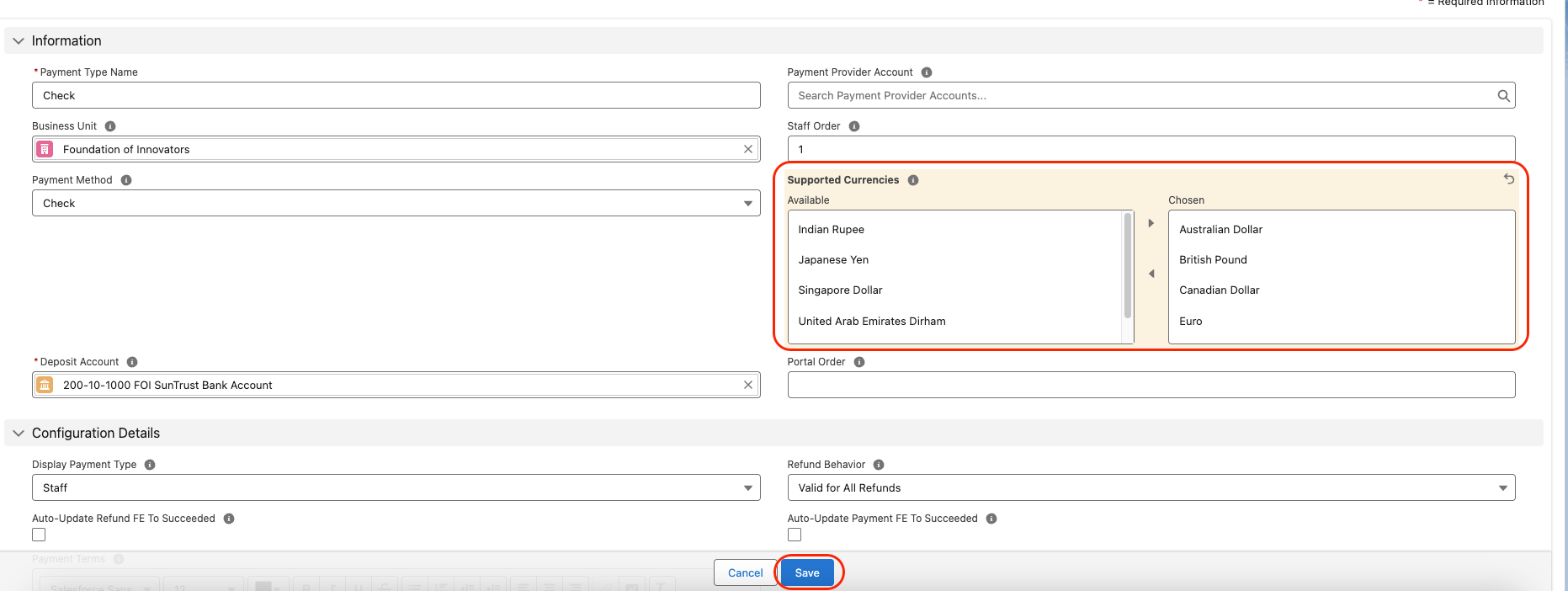
Supported Currencies field on a Payment Type record
Limitations and Common Pitfalls
- The picklist is fixed. Supported Currencies only offers the nine ISO codes listed above. A currency you activate in Salesforce but that is not in this list cannot be selected as supported on a Payment Type. Currency matching is case-insensitive.
- No effect in a single-currency org. Enforcement only applies when multi-currency is enabled. In a single-currency org the field is ignored and the Payment Type is always considered valid.
- Blank means all, not none. A blank field allows every currency. To restrict a Payment Type, you must explicitly choose its currencies.