

FCORE_PAY__Payment_Provider_Account__c, abbreviated PPA below). A Direct Account differs from a connected account in three ways the code enforces:
- API calls go straight to the customer’s Stripe account, with no
Stripe-Accountheader and no platform application fee. - The secret keys are looked up by a per-account prefix you set on the PPA.
- The Direct model must be turned on through a feature parameter (a packaged on/off switch).
For newcomers: Stripe is the payment processor that actually charges the card when you take a payment on an order. A webhook is a URL that Stripe calls to push events (payment succeeded, refunded, customer created) back into your org.
Before You Begin
- Both the Commerce package (
FCORE_PAY) and the Stripe addon (FCORE_PSTRIPE) must be installed in the org. - The
FCORE_PSTRIPE__EnableDirectStripeInstancefeature parameter must be enabled for production. This is a packaged Boolean switch; contact fusionSpan support to have it turned on before you install or configure a live Direct Account. (Sandbox uses a different mechanism — see Step 4.) - You will need the customer’s Stripe publishable key (begins with
pk_) and secret key (begins withsk_).
Configure a Stripe Direct Account in fusionCore
Step 1: Set the Prefix on the Payment Provider Account
The prefix tells fusionCore which secret records to read for this account.1
Open the Payment Provider Account
Open the PPA record for the Stripe Direct Account you are configuring.
2
Set the Stripe MDT Prefix
Set the Stripe MDT Prefix field (
FCORE_PSTRIPE__Stripe_MDT_Prefix__c) to a short value, for example FS.This field is not on the page layout by default. Add it to the layout, or set it with a Salesforce data tool, in order to populate it.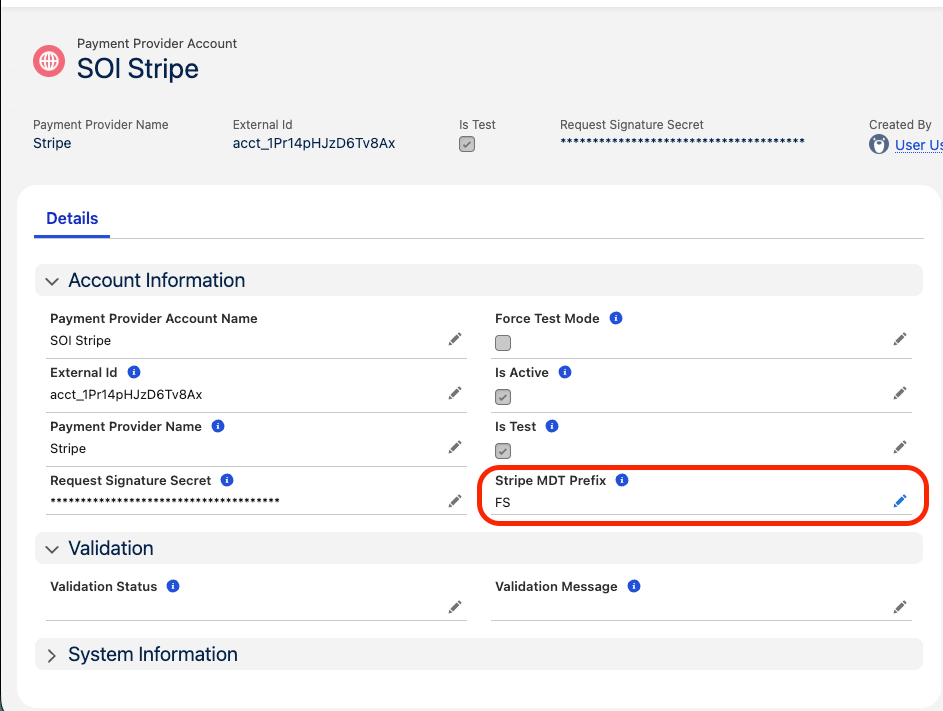
Setting the Stripe MDT Prefix on the Payment Provider Account
Step 2: Create the Prefixed Secret Records
The customer’s Stripe keys are stored in protected Custom Metadata, not on the PPA record. Create one record for each key, named with the prefix you set in Step 1.1
Open Payment Provider Secret
In Salesforce, go to Setup → Custom Metadata Types → Payment Provider Secret and click Manage Records.
2
Create the public key record
Click New. Name it
[Prefix]_Stripe_Public_Key (for example, FS_Stripe_Public_Key) and paste the customer’s publishable key (begins with pk_).3
Create the secret key record
Click New again. Name it
[Prefix]_Stripe_Secret_Key (for example, FS_Stripe_Secret_Key) and paste the customer’s secret key (begins with sk_).Pull both keys from the Stripe account that is connecting directly (Developers → Overview → API keys in the Stripe Dashboard). Request the keys from the customer and store them securely.
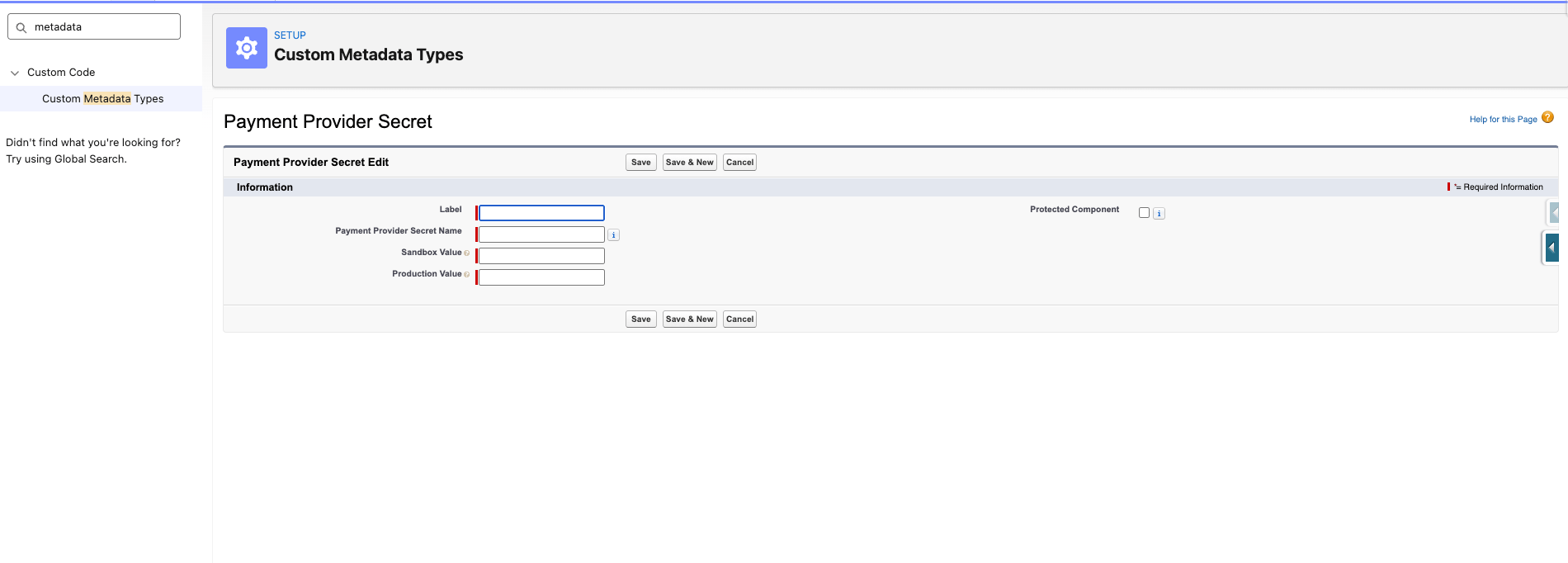
Creating the prefixed Payment Provider Secret records
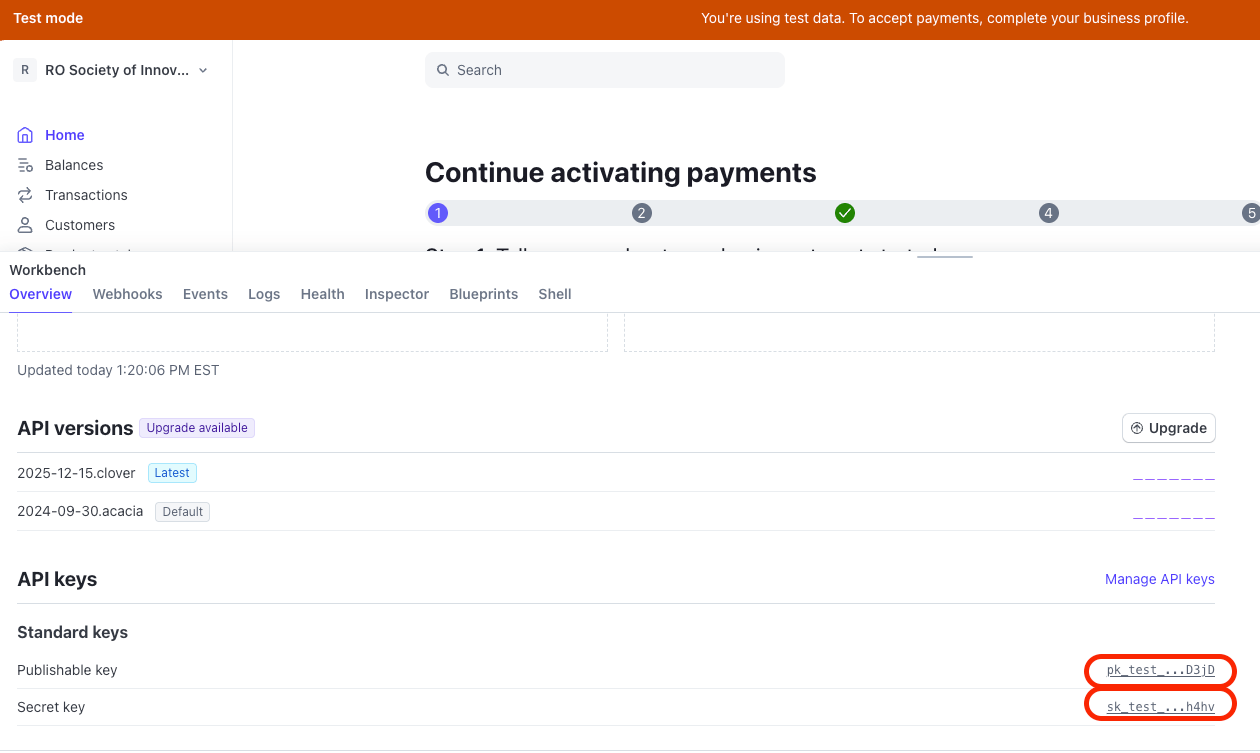
Stripe API keys in the Developers tab
Step 3: Assign Permission Sets
Assign Stripe permission sets to the users who need them:FC_Stripe_Manage— admins and configuration users who manage Stripe settings.FC_Stripe_Access— staff who process payments.FC_Stripe_Portal— portal users who pay through the portal.FC_Stripe_Integration_User— any integration or automation user.
Step 4: Enable and Test the Direct Account Connection
How you turn on the Direct model depends on the environment. Production: theFCORE_PSTRIPE__EnableDirectStripeInstance feature parameter controls Direct mode. Confirm it is enabled (see Before you begin). The FS_Enable_Direct_Stripe_Instance constant described below is ignored in production.
Sandbox: Salesforce does not reliably propagate feature parameters to sandboxes, so Direct mode is controlled by a constant instead.
1
Open Constants
Go to Setup → Custom Metadata Types → Constant and click Manage Records.
2
Find or create the constant
Search for Enable Direct Stripe Instance (
FS_Enable_Direct_Stripe_Instance). If it does not exist, click New and create it with that label and API name.3
Set it to true
Set the checkbox value to True and click Save.
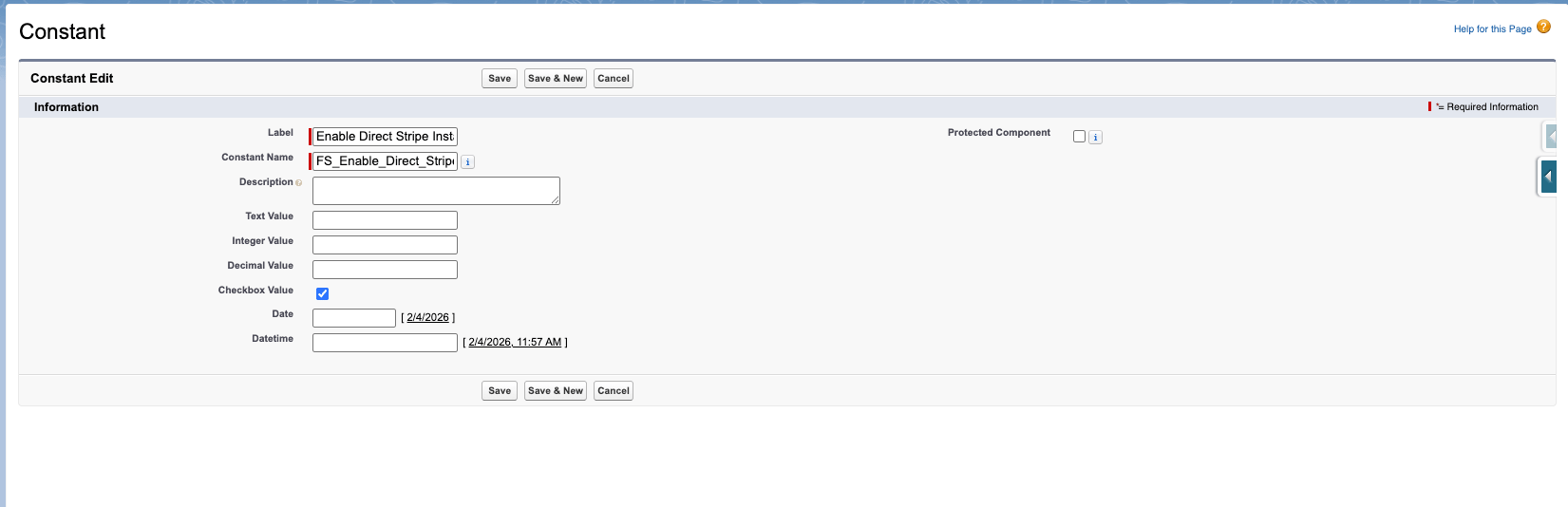
The FS_Enable_Direct_Stripe_Instance constant set to true
customer.created or customer.updated webhook reaches the org. If validation fails, the reason appears in the Validation Message field (FCORE_PAY__Validation_Message__c).
Environment notes
- Sandbox: when
FS_Enable_Direct_Stripe_Instanceis true, the org uses a direct connection even if the customer never requested it, because Salesforce does not propagate feature parameters to sandboxes. Stripe’s guide to creating a sandbox is here. - Production: the
FS_Enable_Direct_Stripe_Instanceconstant is ignored; the feature parameter governs Direct mode instead. - Refreshes: keep the Stripe keys stored in production so they are retained after a sandbox refresh.
Set Up Your Webhook for a Direct Account
The webhook endpoint and the events to subscribe to are the same as for a connected account, but you log into the customer’s own Stripe account. Follow Setting up webhooks for your Salesforce org Stripe Direct Account. The endpoint URL is your Salesforce Site URL with/services/apexrest/FCORE_PSTRIPE/Stripe appended, and must contain no extra slashes or spaces — for example:
FCORE_PAY__Request_Signature_Secret__c) on the PPA, then run Validate.
Supported Payment Types
Stripe Direct Accounts support these payment types. See Enabling payment methods in Stripe for how to turn them on.- Card
- ACH
- WeChat Pay
- Alipay
Alipay and WeChat Pay are available only on Direct Accounts. On a connected-account setup, saving a payment type for these methods is blocked.
Pending Payments and Auto-Cancellation
When a member starts a Stripe payment, Stripe sometimes can’t finish charging immediately and puts the payment in a state calledrequires_action — it is waiting on the member to complete one more step:
- Card → 3-D Secure (the bank’s “verify it’s you” challenge or one-time code).
- ACH → microdeposit verification (confirming the two small test deposits in the bank account).
- Alipay / WeChat Pay → an external redirect or approval in the wallet app.
FCORE_PAY__Payment_Provider_Event__c — the fusionCore record that mirrors one Stripe payment attempt) with status Action Required. If the member walks away and never finishes, the payment would sit in this status indefinitely.
To keep abandoned attempts from lingering, the scheduled FC: Payment Provider Event Validation batch re-checks every payment still in requires_action and cancels it in Stripe once a method-specific timeout passes. When it cancels the payment (with the reason abandoned), the Payment Provider Event status becomes Cancelled.
These thresholds are
FCORE_BASE__Constant__mdt Custom Metadata records. You can change them without code in Setup → Custom Metadata Types → Constant → Manage Records.
Cancellation happens on the next batch run after the timeout is exceeded, so the real delay also depends on how the batch is scheduled (daily by default). Revalidating the order from the pay screen can trigger the check sooner. See Scheduled Jobs in fusionCore for this batch’s schedule and how to manage it.
Limitations and Common Pitfalls
- A prefix is required. With Direct mode on, leaving Stripe MDT Prefix blank throws “Stripe MDT Prefix is blank on Payment Provider Account.” The matching
[Prefix]_Stripe_Public_Keyand[Prefix]_Stripe_Secret_Keyrecords must exist, or callouts fail with “Payment Provider Secret Not Found” / ”…Is Blank.” - Validation completes only after the webhook fires. Clicking Validate does not by itself set Succeeded — it waits for Stripe’s inbound
customer.created/customer.updatedwebhook. If the webhook is misconfigured, validation never completes even when the keys are correct. The customer event is also ignored unless it arrives within about 10 seconds of clicking Validate. - Editing key fields resets validation. Changing External Id (
FCORE_PAY__External_Id__c), Request Signature Secret (FCORE_PAY__Request_Signature_Secret__c), or Stripe MDT Prefix clears the validation status. You must re-run Validate. - External Id must be unique. Two PPAs sharing the same
FCORE_PAY__External_Id__cthrows “Multiple Payment Provider Accounts were found with the same External Id.” - Do not toggle Direct mode on a live account. Switching the
EnableDirectStripeInstancefeature parameter changes call routing, application fees, and which secret records are read. Re-key and re-validate before relying on a flipped account. - Failed webhooks are easy to miss. If the
Stripe-Signatureheader is missing or its HMAC-SHA256 signature does not match, or the request is older than 300 seconds, or the event’ssf_org_iddoes not match this org, the endpoint returns HTTP 204 and skips the event. Stripe sees a success response and does not retry. Check theStripe_API_Log__crecords if events seem to be dropped. - Pending payments auto-cancel. Payments a member never finishes are cancelled after a method-specific timeout. See Pending Payments and Auto-Cancellation above.
Related Features
Set up webhooks for a Direct Account
Point the customer’s own Stripe account back at the Salesforce org.
Stripe Direct accounts email template
The template for requesting the customer’s keys and webhook details.
Enabling payment methods in Stripe
Turn on Card, ACH, Alipay, and WeChat Pay on a Direct account.
Stripe
How the Direct model compares to the default connected-account model.