> ## Documentation Index
> Fetch the complete documentation index at: https://docs.fusioncore.us/llms.txt
> Use this file to discover all available pages before exploring further.
# Renewal Paths
> Use Renewal Path records to control which product a subscription renews into, with priority-ordered, optionally conditional rules.
## Overview
A renewal path controls which product a subscription or membership renews into. By default, with no renewal path, a Purchase Activity renews into the **same** product it currently holds. With renewal paths, you decide that a subscription renews into a different product instead — for example, moving a first-year member onto a standard membership product.
Renewal paths are stored as `Renewal_Path__c` records. When the renewal job runs, it looks for a renewal path whose `Original_Product__c` matches the product on the Purchase Activity, then renews into the matching `Renewal_Product__c`.
## Prerequisites
* The product you are renewing **from** and the product you are renewing **into** both exist as active products.
* You know which product should follow which — and, if the choice depends on data, which Condition record decides eligibility.
## How to Create a Renewal Path
Click the **App Launcher**, type `Renewal Paths`, and select it. The App Launcher is the nine-dots icon at the top-left of Salesforce; it lists every app and object you can open.
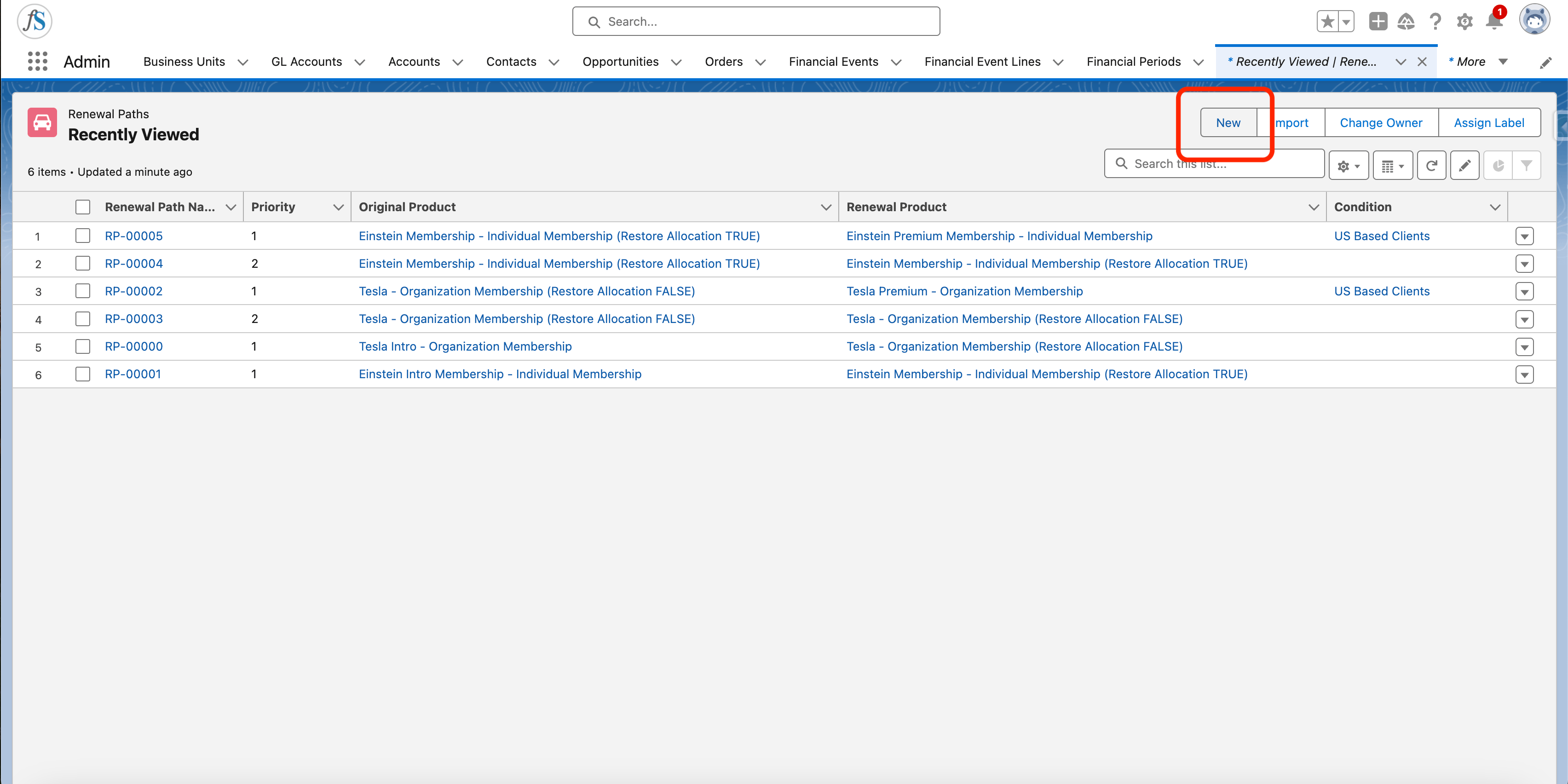
Click **New** at the top-right of the Renewal Paths list.
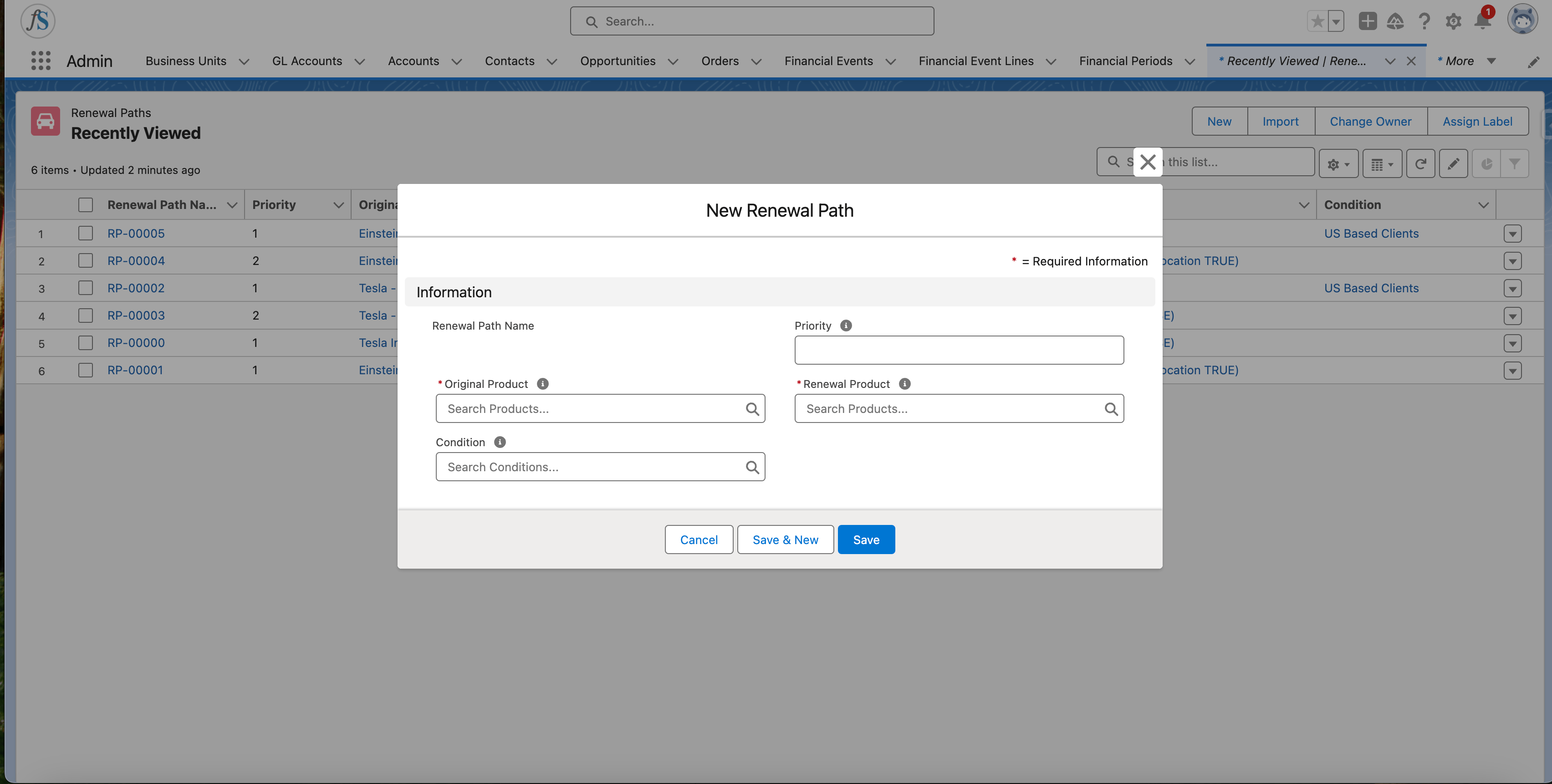
 Complete the new Renewal Path:
1. **Original Product** (`Original_Product__c`) — the product the subscription renews from.
2. **Renewal Product** (`Renewal_Product__c`) — the product the subscription renews into. It must be active.
3. **Priority** (`Priority__c`) — the order this path is evaluated in. A lower number is evaluated first.
4. **Condition** (`Condition__c`, optional) — a Condition record that decides whether this path applies.
Complete the new Renewal Path:
1. **Original Product** (`Original_Product__c`) — the product the subscription renews from.
2. **Renewal Product** (`Renewal_Product__c`) — the product the subscription renews into. It must be active.
3. **Priority** (`Priority__c`) — the order this path is evaluated in. A lower number is evaluated first.
4. **Condition** (`Condition__c`, optional) — a Condition record that decides whether this path applies.
 Click **Save**.
If you create even one renewal path for a product, also create a default fallback path where the product renews into itself. The fallback path should have no condition and the highest `Priority__c` number, so it is evaluated last. Without a fallback, renewals for that product can fail.
## How a Renewal Path Is Chosen
When the renewal job renews a Purchase Activity, it gathers every `Renewal_Path__c` whose `Original_Product__c` matches the current product, then evaluates them in `Priority__c` order — lowest number first. The first path whose `Condition__c` is satisfied (or that has no condition) wins, and the subscription renews into that path's `Renewal_Product__c`.
If no renewal path matches, the subscription falls back to renewing into its current product.
## Renewal Path Fields Quick Reference
| Field | API name | Purpose |
| ---------------- | --------------------- | -------------------------------------------------------------------------------------------------- |
| Original Product | `Original_Product__c` | The product the renewal path renews from — the product on the original Order or Purchase Activity. |
| Renewal Product | `Renewal_Product__c` | The product the renewal path renews into. Must be active. |
| Priority | `Priority__c` | The order paths are evaluated in when more than one matches. Lower numbers are evaluated first. |
| Condition | `Condition__c` | Optional lookup to a Condition record that decides whether the path applies. |
For details on building Condition records, see the [Conditions guide](/end-user-guides/products/conditions/index).
## Limitations and Common Pitfalls
* **The renewal product must be active.** If the matched `Renewal_Product__c` is inactive, renewal fails with `Renewal_Error_Product_Not_Active_V2`. If no renewal product can be resolved at all, renewal fails with `Renewal_Error_Renewal_Product_Not_Found_V2`. Keep your renewal products active and always provide a same-product fallback path.
* **`Priority__c` orders evaluation, lowest first.** Two matching paths with the same priority leave the winner undefined. Give each path a distinct priority.
* **A renewal path needs both products.** A `Renewal_Path__c` requires both an original and a renewal product; without both it errors. The original product cannot be flagged `Is_Not_Renewable__c`.
Click **Save**.
If you create even one renewal path for a product, also create a default fallback path where the product renews into itself. The fallback path should have no condition and the highest `Priority__c` number, so it is evaluated last. Without a fallback, renewals for that product can fail.
## How a Renewal Path Is Chosen
When the renewal job renews a Purchase Activity, it gathers every `Renewal_Path__c` whose `Original_Product__c` matches the current product, then evaluates them in `Priority__c` order — lowest number first. The first path whose `Condition__c` is satisfied (or that has no condition) wins, and the subscription renews into that path's `Renewal_Product__c`.
If no renewal path matches, the subscription falls back to renewing into its current product.
## Renewal Path Fields Quick Reference
| Field | API name | Purpose |
| ---------------- | --------------------- | -------------------------------------------------------------------------------------------------- |
| Original Product | `Original_Product__c` | The product the renewal path renews from — the product on the original Order or Purchase Activity. |
| Renewal Product | `Renewal_Product__c` | The product the renewal path renews into. Must be active. |
| Priority | `Priority__c` | The order paths are evaluated in when more than one matches. Lower numbers are evaluated first. |
| Condition | `Condition__c` | Optional lookup to a Condition record that decides whether the path applies. |
For details on building Condition records, see the [Conditions guide](/end-user-guides/products/conditions/index).
## Limitations and Common Pitfalls
* **The renewal product must be active.** If the matched `Renewal_Product__c` is inactive, renewal fails with `Renewal_Error_Product_Not_Active_V2`. If no renewal product can be resolved at all, renewal fails with `Renewal_Error_Renewal_Product_Not_Found_V2`. Keep your renewal products active and always provide a same-product fallback path.
* **`Priority__c` orders evaluation, lowest first.** Two matching paths with the same priority leave the winner undefined. Give each path a distinct priority.
* **A renewal path needs both products.** A `Renewal_Path__c` requires both an original and a renewal product; without both it errors. The original product cannot be flagged `Is_Not_Renewable__c`.