> ## Documentation Index
> Fetch the complete documentation index at: https://docs.fusioncore.us/llms.txt
> Use this file to discover all available pages before exploring further.
# Subscription Purchase Activities
> How subscription Purchase Activities are created from activated Orders, the key fields they carry, and how to renew, cancel, and track them.
## Overview
A **subscription Purchase Activity** is a `FCORE_PAY__Purchase_Activity__c` record with the Record Type `FC_Subscription`. It is linked to a `Subscription_Plan__c`, and it carries the start date, paid-through date, and renewal fields that drive a subscription's lifecycle.
fusionCore creates a subscription Purchase Activity automatically when you activate an Order that contains a subscription product. You do not create one by hand.
## How to Create a Subscription Purchase Activity
### Prerequisites
* An Order that contains a subscription product.
* That product must have **Purchase Activity Creation** set to **True**.
Open the Order that contains your subscription product.
Activate the Order in one of two ways:
* Take a payment (full or partial) on the Order, or
* On the Order detail page, click **Create Invoice**.
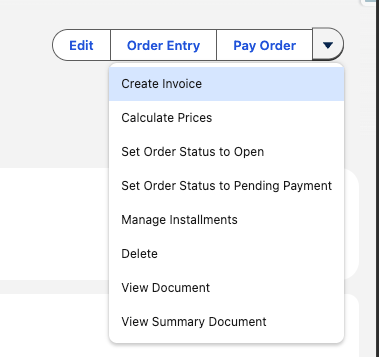 fusionCore creates the subscription Purchase Activity and links it to the Subscription Plan. Open it from the Order or from the related Account or Contact.
The status of the Purchase Activity depends on the subscription's start date. If the start date is in the future, the status is **Pending**. Otherwise, the status is **Active**.
## Key Fields on a Subscription Purchase Activity
These are the fields you read most often on a subscription Purchase Activity.
| Field | API name | Purpose |
| --------------------- | ----------------------------- | --------------------------------------------------------------------------------------------- |
| Start Date | `Start_Date__c` | The date the subscription term begins. |
| End Date | `End_Date__c` | The **Paid-Through Date** — the last day the current term is paid for. See the warning below. |
| Subscription Plan | `Subscription_Plan__c` | Lookup to the `Subscription_Plan__c` that drives the term and renewal behavior. |
| Is Subscription | `Is_Subscription__c` | A read-only formula that mirrors the product's **Is Subscription** flag. |
| Status | `FCORE_PAY__Status__c` | Active, Pending, Expired, or Cancelled. |
| Customer Type | `FCORE_PAY__Customer_Type__c` | Organization or Individual. |
| Renewal Status | `Renewal_Status__c` | Pending (the default), Do Not Renew, Failed, or Generated. |
| Days Until Lapse | `Days_Until_Lapse__c` | How many days remain until the subscription lapses. |
| Grace Period End Date | `Grace_Period_End_Date__c` | The last day of the grace period after the paid-through date. |
**End Date is the Paid-Through Date, not the day access stops.** `End_Date__c` is the last day the current term is paid for. Access can continue past it during the grace period. The day access actually ends is tracked separately by `Grace_Period_End_Date__c` and `Days_Until_Lapse__c`. Do not treat `End_Date__c` as the lapse date.
`Is_Subscription__c` is a formula field that copies the product's **Is Subscription** flag. You cannot edit it directly. If the product's flag is not set, the record is not treated as a subscription and renewals will not run for it.
## Working with Subscription Purchase Activities
How the nightly job generates renewal Orders for subscriptions that are due.
How to stop a subscription from renewing and what fusionCore cleans up.
The membership fields that roll up to the Account and Contact.
Let members joining late in a Calendar term roll into the next full term.
fusionCore creates the subscription Purchase Activity and links it to the Subscription Plan. Open it from the Order or from the related Account or Contact.
The status of the Purchase Activity depends on the subscription's start date. If the start date is in the future, the status is **Pending**. Otherwise, the status is **Active**.
## Key Fields on a Subscription Purchase Activity
These are the fields you read most often on a subscription Purchase Activity.
| Field | API name | Purpose |
| --------------------- | ----------------------------- | --------------------------------------------------------------------------------------------- |
| Start Date | `Start_Date__c` | The date the subscription term begins. |
| End Date | `End_Date__c` | The **Paid-Through Date** — the last day the current term is paid for. See the warning below. |
| Subscription Plan | `Subscription_Plan__c` | Lookup to the `Subscription_Plan__c` that drives the term and renewal behavior. |
| Is Subscription | `Is_Subscription__c` | A read-only formula that mirrors the product's **Is Subscription** flag. |
| Status | `FCORE_PAY__Status__c` | Active, Pending, Expired, or Cancelled. |
| Customer Type | `FCORE_PAY__Customer_Type__c` | Organization or Individual. |
| Renewal Status | `Renewal_Status__c` | Pending (the default), Do Not Renew, Failed, or Generated. |
| Days Until Lapse | `Days_Until_Lapse__c` | How many days remain until the subscription lapses. |
| Grace Period End Date | `Grace_Period_End_Date__c` | The last day of the grace period after the paid-through date. |
**End Date is the Paid-Through Date, not the day access stops.** `End_Date__c` is the last day the current term is paid for. Access can continue past it during the grace period. The day access actually ends is tracked separately by `Grace_Period_End_Date__c` and `Days_Until_Lapse__c`. Do not treat `End_Date__c` as the lapse date.
`Is_Subscription__c` is a formula field that copies the product's **Is Subscription** flag. You cannot edit it directly. If the product's flag is not set, the record is not treated as a subscription and renewals will not run for it.
## Working with Subscription Purchase Activities
How the nightly job generates renewal Orders for subscriptions that are due.
How to stop a subscription from renewing and what fusionCore cleans up.
The membership fields that roll up to the Account and Contact.
Let members joining late in a Calendar term roll into the next full term.