> ## Documentation Index
> Fetch the complete documentation index at: https://docs.fusioncore.us/llms.txt
> Use this file to discover all available pages before exploring further.
# Linking Plans to Products
> Link a Subscription Plan to a product with a Product Subscription Plan record, and set the default plan used at renewal.
## Overview
A Subscription Plan does nothing on its own — it has to be linked to the product that uses it. fusionCore connects the two with a **Product Subscription Plan** record (`Product_Subscription_Plan__c`), a junction that ties one product (`Product2`) to one `Subscription_Plan__c`. A product can be linked to several plans, and one of those links is marked as the **default**.
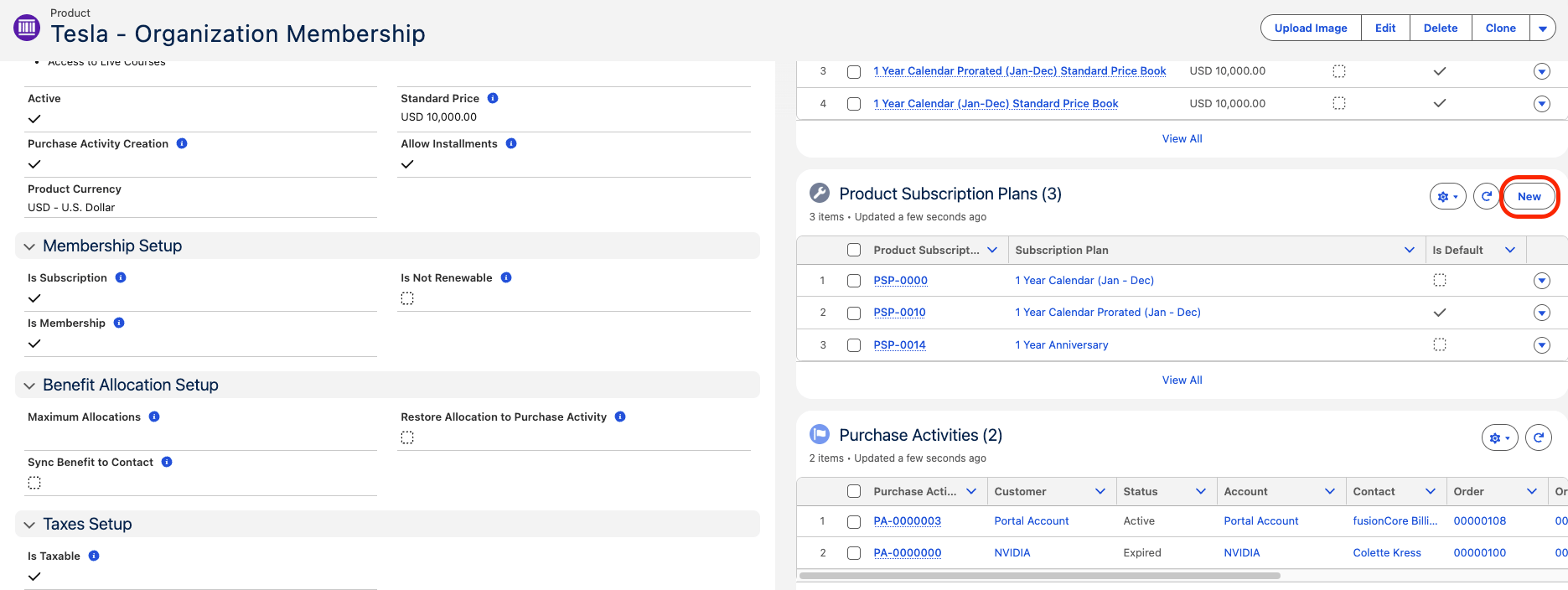
You can create the link from either the **Product** record or the **Subscription Plan** record — both have a **Product Subscription Plans** related list.
This page covers the plan-to-product link itself. For the full subscription-product setup — creating the product, linking its price books, then activating it — see [Subscription Products](/end-user-guides/products/product-set-up/subscription-products).
## Prerequisites
* A Subscription Plan (Anniversary or Calendar). See [Subscription Plans Overview](/end-user-guides/subscriptions/subscription-plans/index).
* A subscription product — a `Product2` with **Is Subscription** (`Is_Subscription__c`) checked. See [Subscription Products](/end-user-guides/products/product-set-up/subscription-products).
## How to Link a Plan to a Product
On the Product record (or on the Subscription Plan record), find the **Product Subscription Plans** related list and click **New**.
 On the new **Product Subscription Plan** record, set the **Product** (`Product__c`) and the **Subscription Plan** (`Subscription_Plan__c`) you want to link. When you start from the Product or the Subscription Plan record, that side is filled in for you.
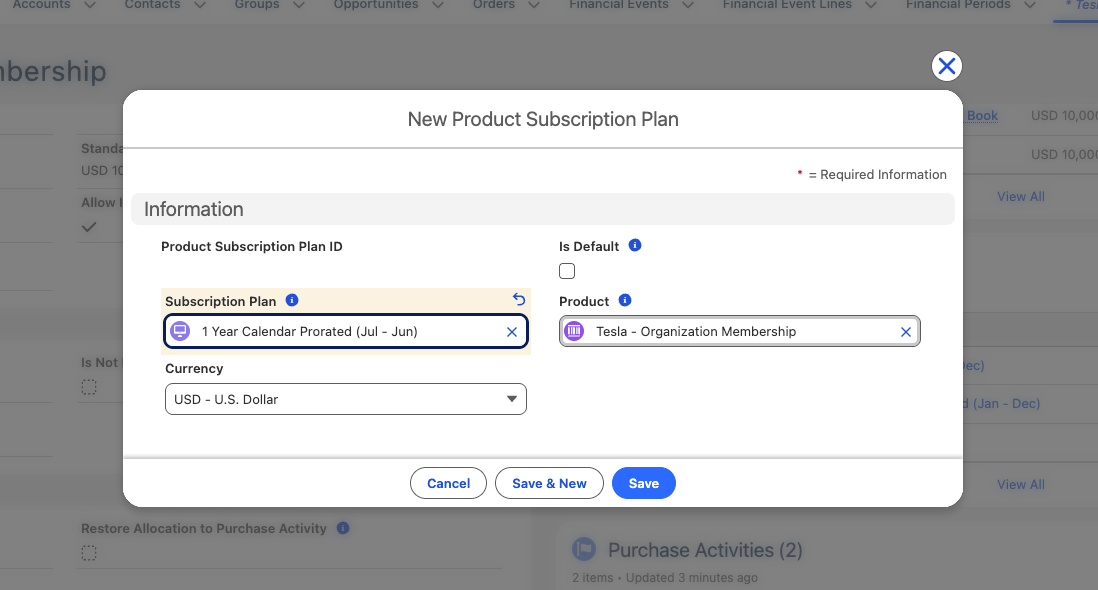 If this is the plan the product should use by default, check **Is Default** (`Is_Default__c`). Each product can have only **one** default Product Subscription Plan — see [The Default Plan](#the-default-plan) below.
Click **Save**. Repeat for each Subscription Plan you want this product to offer.
A subscription product cannot be sold until it is linked to at least one Subscription Plan **and** that plan's price book, and then marked **Active** (`IsActive`). The price-book step is covered in [Subscription Products](/end-user-guides/products/product-set-up/subscription-products).
## The Default Plan
A product can be linked to more than one Subscription Plan, but exactly one of those links can be the **default** (`Is_Default__c`). The default plan is the **renewal fallback**: when a subscription renews and the renewing Purchase Activity's own plan is not valid for the renewal product, renewal uses the product's default plan instead. Because of this, any product used in renewals should have a default plan.
## Limitations and Common Pitfalls
* **One default per product.** A product can have many Product Subscription Plan links, but only one may have **Is Default** checked. Marking a second link as default on the same product is blocked with a validation error (`Product_Cannot_Have_Multiple_Default_Product_Subscription_Plans_V2`).
* **A product without a default can break renewal.** Renewal falls back to the default plan when the renewing Purchase Activity's plan isn't valid for the renewal product; if the product has no default, the renewal fails (`Default_Subscription_Plan_Is_Missing_V2`).
* **The product is not sellable until it is fully linked.** Link it to at least one Subscription Plan and that plan's price book before checking the standard Salesforce **Active** (`IsActive`) field.
* **Deleting a plan does not warn you.** If a Subscription Plan is deleted, the link from any Purchase Activity to that plan is silently cleared, which then breaks that subscription's renewal.
If this is the plan the product should use by default, check **Is Default** (`Is_Default__c`). Each product can have only **one** default Product Subscription Plan — see [The Default Plan](#the-default-plan) below.
Click **Save**. Repeat for each Subscription Plan you want this product to offer.
A subscription product cannot be sold until it is linked to at least one Subscription Plan **and** that plan's price book, and then marked **Active** (`IsActive`). The price-book step is covered in [Subscription Products](/end-user-guides/products/product-set-up/subscription-products).
## The Default Plan
A product can be linked to more than one Subscription Plan, but exactly one of those links can be the **default** (`Is_Default__c`). The default plan is the **renewal fallback**: when a subscription renews and the renewing Purchase Activity's own plan is not valid for the renewal product, renewal uses the product's default plan instead. Because of this, any product used in renewals should have a default plan.
## Limitations and Common Pitfalls
* **One default per product.** A product can have many Product Subscription Plan links, but only one may have **Is Default** checked. Marking a second link as default on the same product is blocked with a validation error (`Product_Cannot_Have_Multiple_Default_Product_Subscription_Plans_V2`).
* **A product without a default can break renewal.** Renewal falls back to the default plan when the renewing Purchase Activity's plan isn't valid for the renewal product; if the product has no default, the renewal fails (`Default_Subscription_Plan_Is_Missing_V2`).
* **The product is not sellable until it is fully linked.** Link it to at least one Subscription Plan and that plan's price book before checking the standard Salesforce **Active** (`IsActive`) field.
* **Deleting a plan does not warn you.** If a Subscription Plan is deleted, the link from any Purchase Activity to that plan is silently cleared, which then breaks that subscription's renewal.