> ## Documentation Index
> Fetch the complete documentation index at: https://docs.fusioncore.us/llms.txt
> Use this file to discover all available pages before exploring further.
# Subscription Cancellation
> Cancel a subscription so it does not renew, from a Purchase Activity record or the portal, and understand what fusionCore changes and removes.
## Overview
The **Subscription Cancellation** feature lets staff and portal users cancel a subscription so it will not renew. You can cancel from a quick action on the Purchase Activity record, or a member can cancel from the portal.
## How Cancellation Works
Cancelling a subscription stops it from **renewing** — it does not end the member's current access (to do that, see [Ending a Subscription Immediately](#ending-a-subscription-immediately)). fusionCore supports one cancellation type, **Cancel Renewal**.
When you cancel, fusionCore marks the Purchase Activity (`FCORE_PAY__Purchase_Activity__c`):
| Field | Set to |
| --------------------------------------------------------- | ------------------------------------- |
| **Renewal Status** (`Renewal_Status__c`) | `Do Not Renew` |
| **Cancellation Date** (`FCORE_PAY__Cancellation_Date__c`) | Today |
| **Cancelled** (`FCORE_PAY__Is_Cancelled__c`) | Checked |
| **Grace Period End Date** (`Grace_Period_End_Date__c`) | The paid-through date (`End_Date__c`) |
If a renewal Order was **already generated** for the subscription, cancelling also deletes it — so the customer isn't billed for a renewal they cancelled — removing, in order: any pending installment Financial Event lines, the now-empty Financial Events, the renewal Order Product, and finally the renewal Order itself.
These deletions are permanent. Cancellation hard-deletes the generated renewal Order, Order Product, and Financial Event records — they are not sent to the Recycle Bin and cannot be restored. Only cancel when you are sure the renewal should not happen.
## Cancellation as a Staff User
How to cancel a subscription from Salesforce.
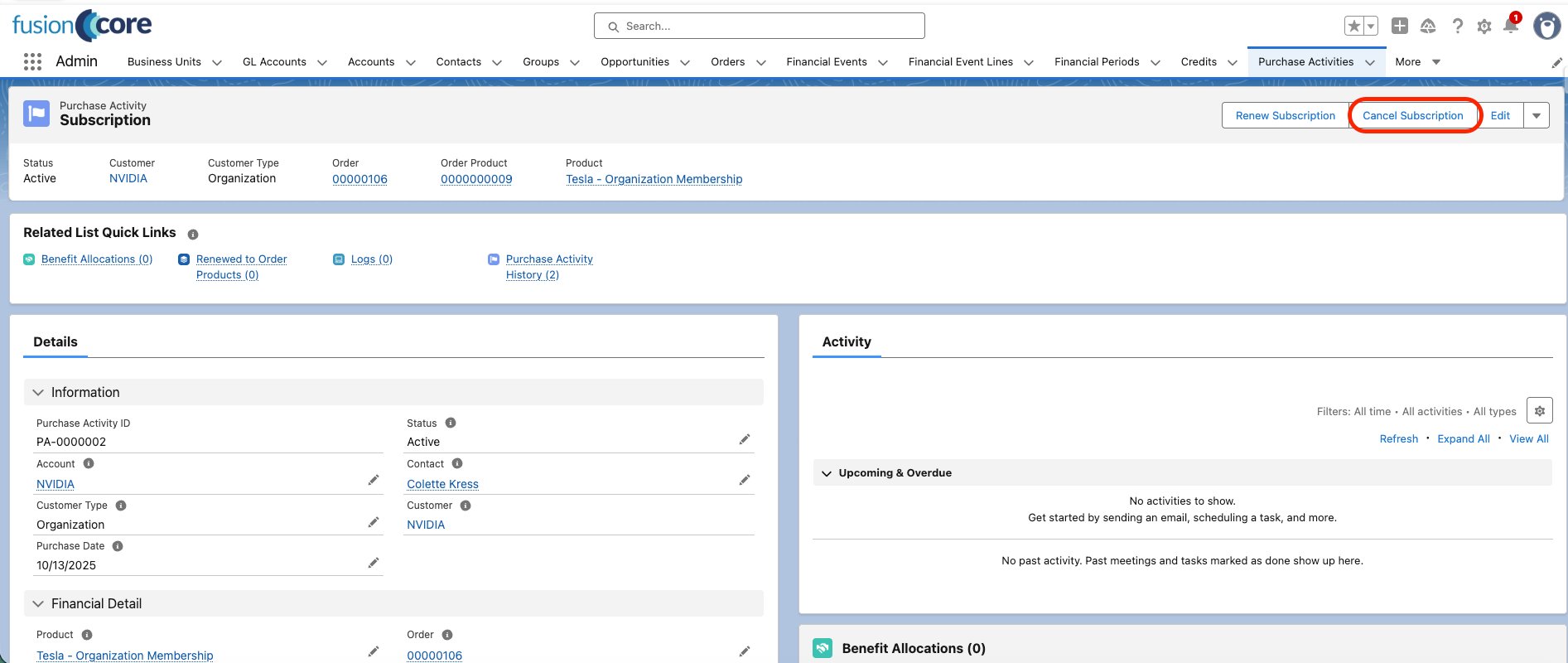
Open the Purchase Activity record for the subscription you want to cancel.
Click **Cancel Subscription**.
 In the confirmation modal, click **Confirm**.
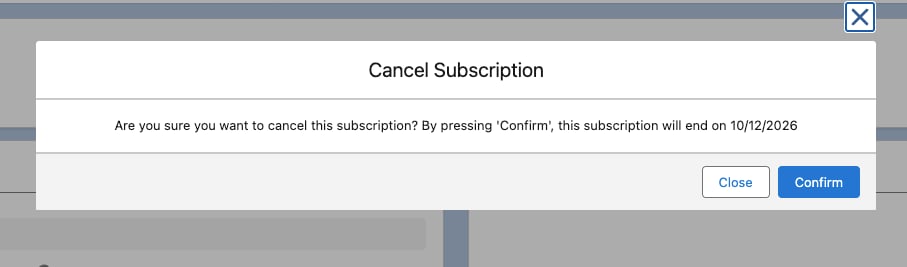 The member keeps access to their subscription features until the `End_Date__c` passes. Cancelling only stops the subscription from renewing — it does not end access immediately.
## Cancellation as a Portal User
Members can cancel their own subscription from the portal. This self-service flow is provided by the fusionCore Portal Components package and runs on an Experience Cloud page. To place and configure the portal component, see [Cancel Subscription](/end-user-guides/portal/subscription-hub/cancel-subscription).
On the Purchase Activity record, open the **Portal Cancel Subscription URL** (`FS_Portal_Cancel_Subscription_URL__c`) — a formula link to the member's portal cancellation page. You can also surface this field in the portal using [Roster Settings](/end-user-guides/portal/portal-order-page-roster-settings/index).
The member keeps access to their subscription features until the `End_Date__c` passes. Cancelling only stops the subscription from renewing — it does not end access immediately.
## Cancellation as a Portal User
Members can cancel their own subscription from the portal. This self-service flow is provided by the fusionCore Portal Components package and runs on an Experience Cloud page. To place and configure the portal component, see [Cancel Subscription](/end-user-guides/portal/subscription-hub/cancel-subscription).
On the Purchase Activity record, open the **Portal Cancel Subscription URL** (`FS_Portal_Cancel_Subscription_URL__c`) — a formula link to the member's portal cancellation page. You can also surface this field in the portal using [Roster Settings](/end-user-guides/portal/portal-order-page-roster-settings/index).
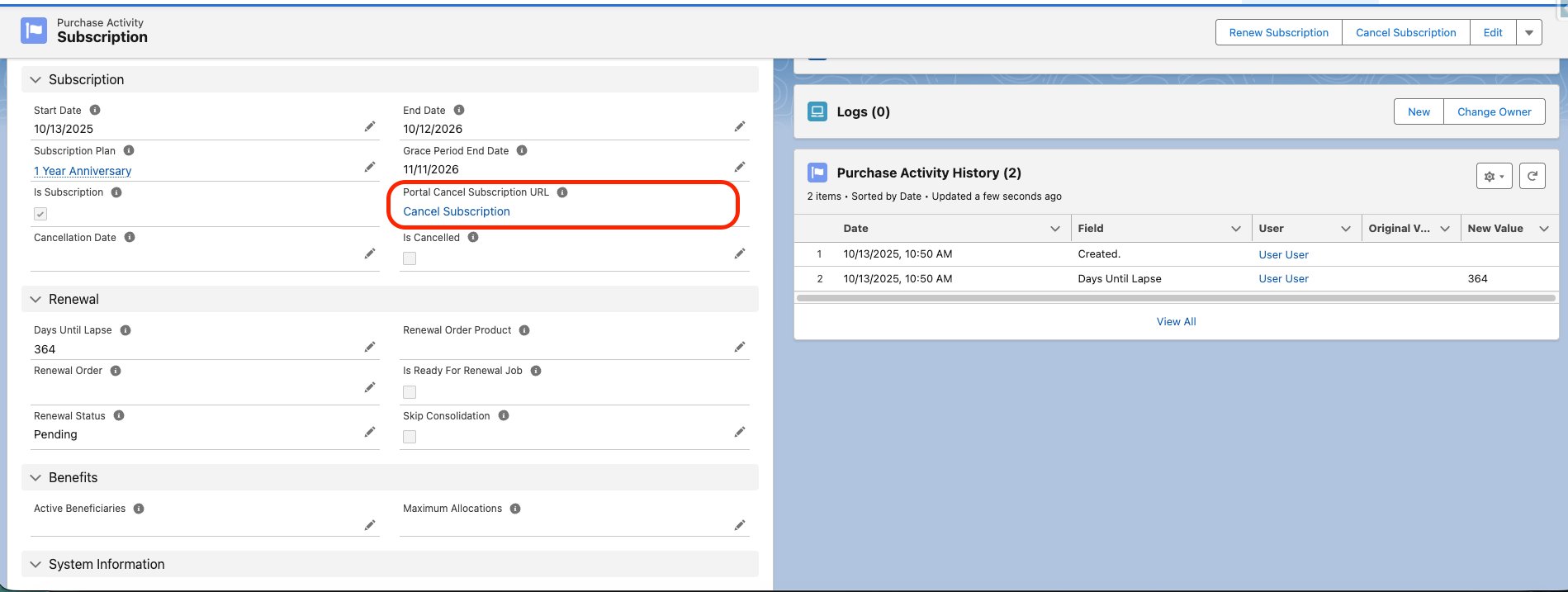 The link only appears when the subscription is still active (not already cancelled) **and** the Purchase Activity's Business Unit has both a **Portal URL** and a **Portal Cancel Subscription Page Path** (`FS_Portal_Cancel_Subscription_Page_Path__c`) configured. If either Business Unit field is missing, the field is blank with no error.
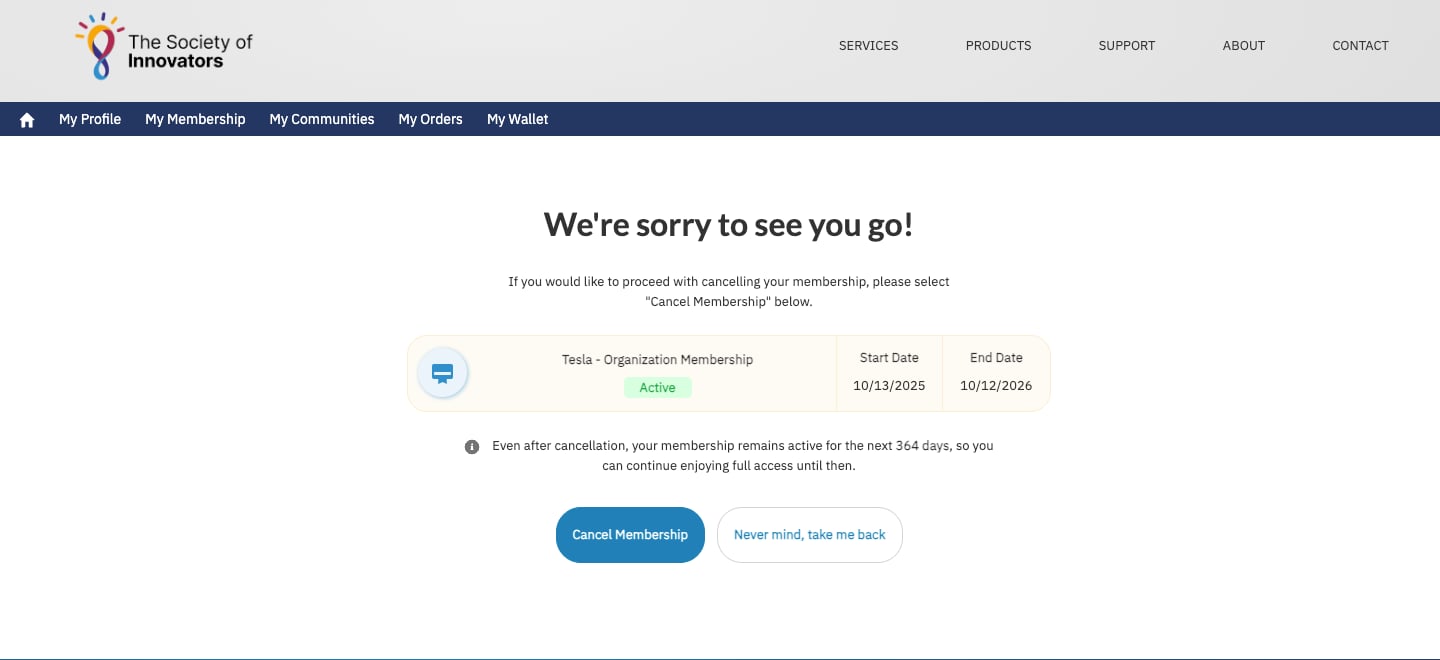
On the portal cancellation page, the member clicks **Cancel Membership**.
The link only appears when the subscription is still active (not already cancelled) **and** the Purchase Activity's Business Unit has both a **Portal URL** and a **Portal Cancel Subscription Page Path** (`FS_Portal_Cancel_Subscription_Page_Path__c`) configured. If either Business Unit field is missing, the field is blank with no error.
On the portal cancellation page, the member clicks **Cancel Membership**.
 **Who can cancel from the portal.** By default, only the contact who holds the subscription (the Purchase Activity's contact) can cancel it. For organization subscriptions, an administrator can additionally allow the account's **Billing Contact** or **Primary Contact** to cancel by turning on the `FS_Billing_Contact_Can_Cancel_Org_Subs` or `FS_Primary_Contact_Can_Cancel_Org_Subs` Constant — both ship turned off. A member who isn't eligible sees "You're not eligible to cancel this subscription."
## Ending a Subscription Immediately
Cancellation alone leaves the current active membership access in place until the paid-through date. To end a subscription right away:
Cancel the Purchase Activity as a staff user or a portal user, using the steps above.
Set `End_Date__c` to the current date.
Setting `End_Date__c` to today removes the customer's access to their subscription features.
## Limitations and Common Pitfalls
* **Only the Cancel Renewal type is implemented.** `CancelSubscriptionEH` handles only the Cancel Renewal action. Any other cancellation type is silently ignored — nothing happens and no error is raised.
* **Deletions are irreversible.** Cancellation hard-deletes the generated renewal Order, Order Product, and pending installment Financial Events. They bypass the Recycle Bin and cannot be recovered.
* **The grace window is removed.** Cancellation overwrites `Grace_Period_End_Date__c` with `End_Date__c`, so any remaining grace period after the paid-through date is dropped.
* **Partial failures can leave orphans.** During cancellation fusionCore disables the `OrderPendingPaymentVTU` and `OrderItemPendingPaymentVTU` validations. If part of the delete sequence fails, the error is logged rather than thrown, which can leave orphaned renewal records behind. Spot-check the renewal Order after cancelling a subscription that already had a renewal generated.
**Who can cancel from the portal.** By default, only the contact who holds the subscription (the Purchase Activity's contact) can cancel it. For organization subscriptions, an administrator can additionally allow the account's **Billing Contact** or **Primary Contact** to cancel by turning on the `FS_Billing_Contact_Can_Cancel_Org_Subs` or `FS_Primary_Contact_Can_Cancel_Org_Subs` Constant — both ship turned off. A member who isn't eligible sees "You're not eligible to cancel this subscription."
## Ending a Subscription Immediately
Cancellation alone leaves the current active membership access in place until the paid-through date. To end a subscription right away:
Cancel the Purchase Activity as a staff user or a portal user, using the steps above.
Set `End_Date__c` to the current date.
Setting `End_Date__c` to today removes the customer's access to their subscription features.
## Limitations and Common Pitfalls
* **Only the Cancel Renewal type is implemented.** `CancelSubscriptionEH` handles only the Cancel Renewal action. Any other cancellation type is silently ignored — nothing happens and no error is raised.
* **Deletions are irreversible.** Cancellation hard-deletes the generated renewal Order, Order Product, and pending installment Financial Events. They bypass the Recycle Bin and cannot be recovered.
* **The grace window is removed.** Cancellation overwrites `Grace_Period_End_Date__c` with `End_Date__c`, so any remaining grace period after the paid-through date is dropped.
* **Partial failures can leave orphans.** During cancellation fusionCore disables the `OrderPendingPaymentVTU` and `OrderItemPendingPaymentVTU` validations. If part of the delete sequence fails, the error is logged rather than thrown, which can leave orphaned renewal records behind. Spot-check the renewal Order after cancelling a subscription that already had a renewal generated.