> ## Documentation Index
> Fetch the complete documentation index at: https://docs.fusioncore.us/llms.txt
> Use this file to discover all available pages before exploring further.
# Subscription Hub Overview
> The Subscription Hub lets a portal user manage all of their subscriptions from one place — renewing, managing benefits, and cancelling — with visibility and management controlled per subscription product.
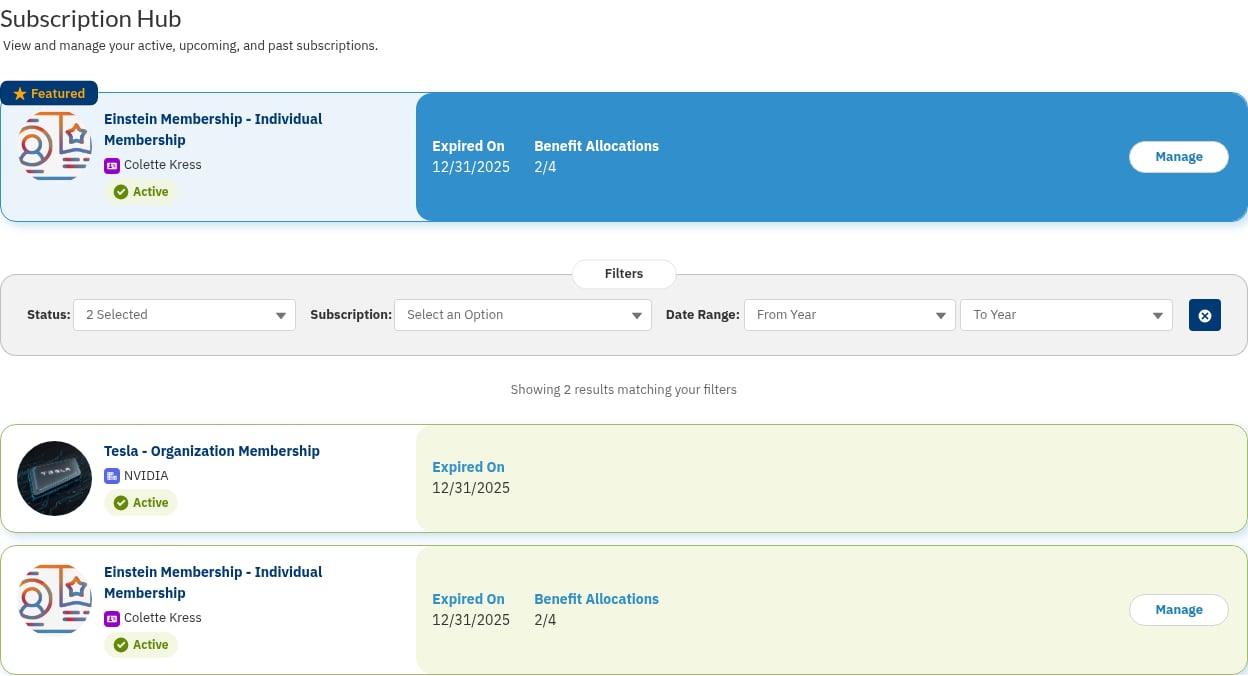
The Subscription Hub gives a logged-in portal user a single place to see and act on their subscriptions. From the hub a member can renew a subscription, manage its settings and payment method, allocate the subscription's benefits to other contacts, and start a cancellation.
 The hub and its companion components are part of the unmanaged **Portal Components** package (`fs_portal_*` Lightning web components, `FS_PORTAL_*` Apex, no namespace prefix). Because they are unmanaged, you can customize them — but always **clone** a component before changing it so that package upgrades do not overwrite your edits.
## What the Hub Shows
The Subscription Hub component (`fs_portal_subscriptionHub`) lists the subscriptions a contact is allowed to see, with a card for each one. Each card links to the relevant action — Manage, Renew, Manage Benefits, or Cancel — and those actions are themselves rendered by companion components such as `fs_portal_manageSubscription` and `fs_portal_renewSubscription`.
Two settings on each subscription `Product2` record govern what a member can do:
* **Subscription Visibility** (`FS_PORTAL_Subscription_Visibility__c`) — a multi-select picklist that controls **who sees** a subscription in the hub. Options include Subscription Contact, Billing Contact, Primary Contact, Organization Contacts, Child Account Contacts, and Benefit Allocation Contacts.
* **Manage Subscription** (`FS_PORTAL_Manage_Subscription__c`) — a multi-select picklist with the same options that controls **who may manage** a subscription (including managing its benefit allocations).
Only Purchase Activities for subscription products (`FCORE_MEM__Is_Subscription__c = TRUE`) appear in the hub.
## Working with the Subscription Hub
Place the hub and its companion components on your portal pages and configure each subscription product's visibility and management settings.
How a portal user views, manages, and renews their subscriptions from the hub.
How a portal user allocates a subscription's benefits to other contacts on their account.
Place the Manage Benefits page that members reach from the hub to allocate their benefits.
Set up the portal flow that lets a member cancel an active subscription.
The hub and its companion components are part of the unmanaged **Portal Components** package (`fs_portal_*` Lightning web components, `FS_PORTAL_*` Apex, no namespace prefix). Because they are unmanaged, you can customize them — but always **clone** a component before changing it so that package upgrades do not overwrite your edits.
## What the Hub Shows
The Subscription Hub component (`fs_portal_subscriptionHub`) lists the subscriptions a contact is allowed to see, with a card for each one. Each card links to the relevant action — Manage, Renew, Manage Benefits, or Cancel — and those actions are themselves rendered by companion components such as `fs_portal_manageSubscription` and `fs_portal_renewSubscription`.
Two settings on each subscription `Product2` record govern what a member can do:
* **Subscription Visibility** (`FS_PORTAL_Subscription_Visibility__c`) — a multi-select picklist that controls **who sees** a subscription in the hub. Options include Subscription Contact, Billing Contact, Primary Contact, Organization Contacts, Child Account Contacts, and Benefit Allocation Contacts.
* **Manage Subscription** (`FS_PORTAL_Manage_Subscription__c`) — a multi-select picklist with the same options that controls **who may manage** a subscription (including managing its benefit allocations).
Only Purchase Activities for subscription products (`FCORE_MEM__Is_Subscription__c = TRUE`) appear in the hub.
## Working with the Subscription Hub
Place the hub and its companion components on your portal pages and configure each subscription product's visibility and management settings.
How a portal user views, manages, and renews their subscriptions from the hub.
How a portal user allocates a subscription's benefits to other contacts on their account.
Place the Manage Benefits page that members reach from the hub to allocate their benefits.
Set up the portal flow that lets a member cancel an active subscription.