> ## Documentation Index
> Fetch the complete documentation index at: https://docs.fusioncore.us/llms.txt
> Use this file to discover all available pages before exploring further.
# Metadata Settings for Installments
> Configure the defaults that seed the Manage Installments screen, plus the constants that control installment spacing and batch sizing.
## Overview
You configure the defaults that pre-fill the **Manage Installments** component, along with a couple of constants that affect how installments are generated. These are admin settings configured in Setup, not on individual records.
## Prerequisites
* You need access to **Custom Metadata Types** and **Custom Settings** in Salesforce Setup.
## The Default Installment Generator Setting
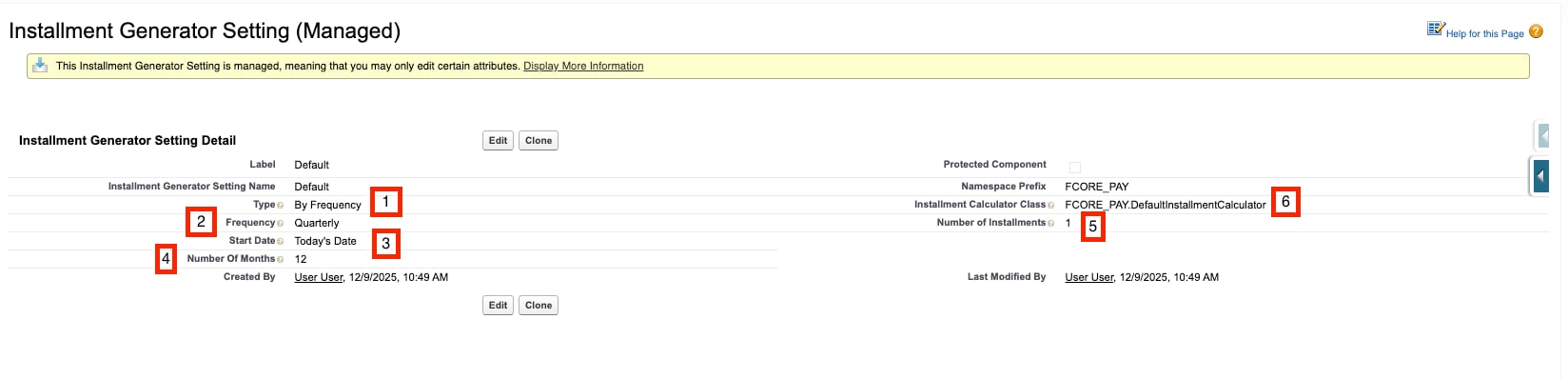
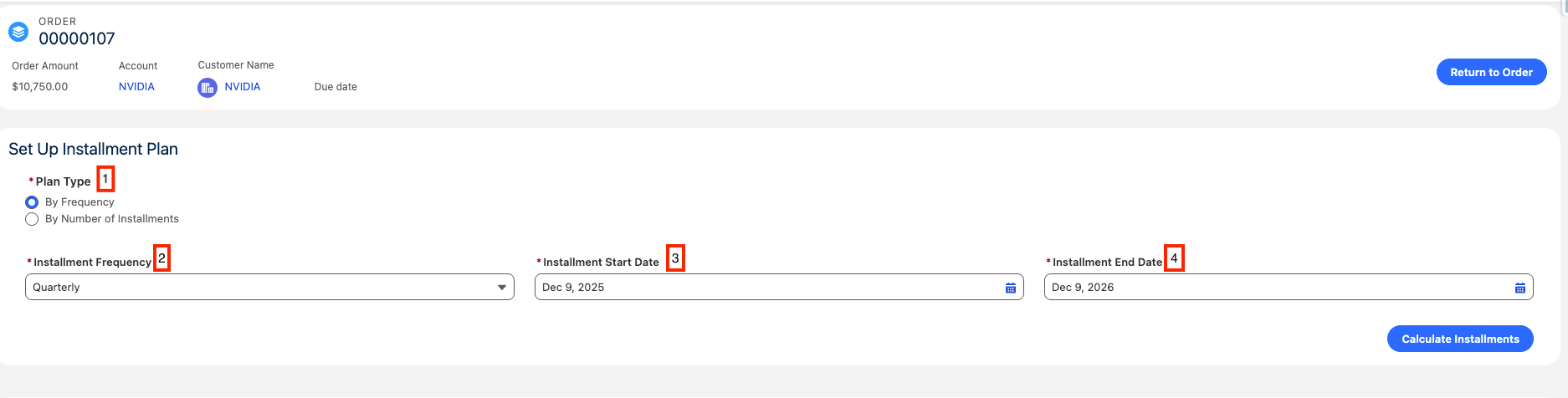
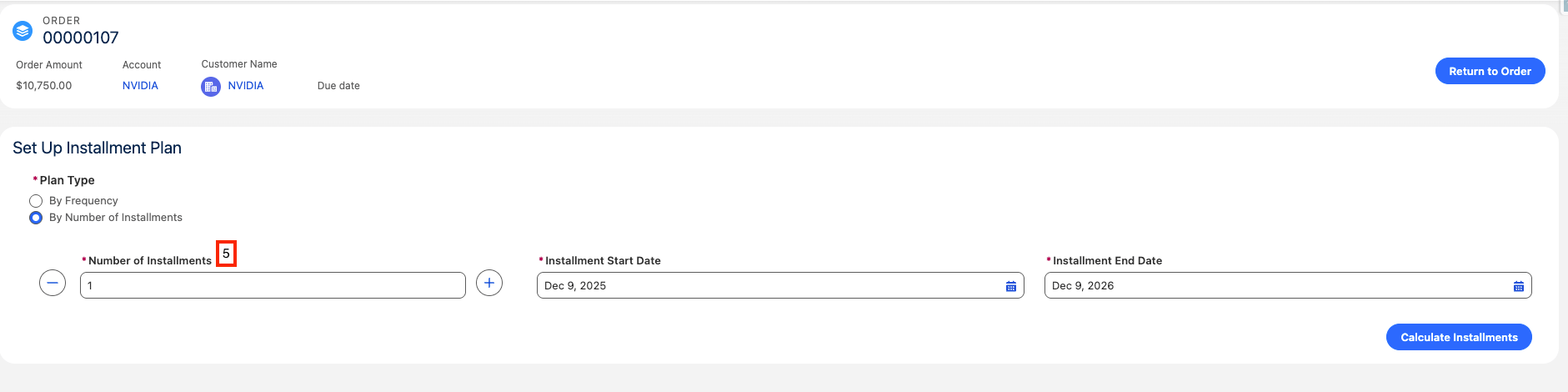
The values that appear when staff first open the **Manage Installments** component come from the `Default` record of the `Installment_Generator_Setting__mdt` custom metadata type — a configuration record stored in metadata.
To edit it, go to **Setup → Custom Metadata Types → Installment Generator Setting → Manage Records**, then open the record named `Default`.
| Field | Field API Name | Purpose |
| ---------------------------- | --------------------------------- | ------------------------------------------------------------------------------------------------------------------------------------------------- |
| Type | `Type__c` | The default plan type in the component — `By Frequency` or `By Number of Installments`. |
| Frequency | `Frequency__c` | The default value for the **Frequency** picklist when the plan type is By Frequency. |
| Number Of Months | `Number_Of_Months__c` | The default number of months between the start and end dates. |
| Number of Installments | `Number_of_Installments__c` | The default count when the plan type is By Number of Installments. |
| Start Date | `Start_Date__c` | The default start date. This is a text field; the literal value `Today's Date` seeds today's date, and `Keep Blank` leaves the field empty. |
| Installment Calculator Class | `Installment_Calculator_Class__c` | The Apex class used to calculate the schedule. It must implement the `FCORE_PAY.InstallmentCalculator` interface. You can swap in a custom class. |
 ## Related Constants
Two constants tune how installments behave. Constants are stored as `FCORE_BASE__Constant` records.
| Constant | Purpose | Default |
| ----------------------------------------- | --------------------------------------------------------------------------------------------------------------------------------------------- | ------------------------------------------------ |
| `FC_Same_Wallet_Spacing_Offset` | The number of days to shift one installment when two installments would charge the same Wallet Item on the same date, so they do not collide. | `1` |
| `FC_Generate_Installments_Batch_Job_Size` | The batch chunk size used when generating installments. | No record ships; the effective default is `200`. |
`FC_Generate_Installments_Batch_Job_Size` does not ship as a record. When no record exists, the code falls back to a batch size of `200`. You only need to create this constant if you want a different chunk size.
## Limitations and Common Pitfalls
* **The custom calculator must implement the interface.** A class set in `Installment_Calculator_Class__c` must implement `FCORE_PAY.InstallmentCalculator`, or installment generation will fail.
* **Start Date is text, not a date field.** `Start_Date__c` accepts specific literal values (`Today's Date`, `Keep Blank`) rather than an actual date. A different value will not seed a usable default.
* **The metadata only seeds defaults.** These values pre-fill the Manage Installments component; staff can still change them per Order before generating.
* **`FC_Generate_Installments_Batch_Job_Size` ships no record.** Without a record, the effective batch size is `200`. Do not assume a record exists when troubleshooting batch sizing.
## Related Constants
Two constants tune how installments behave. Constants are stored as `FCORE_BASE__Constant` records.
| Constant | Purpose | Default |
| ----------------------------------------- | --------------------------------------------------------------------------------------------------------------------------------------------- | ------------------------------------------------ |
| `FC_Same_Wallet_Spacing_Offset` | The number of days to shift one installment when two installments would charge the same Wallet Item on the same date, so they do not collide. | `1` |
| `FC_Generate_Installments_Batch_Job_Size` | The batch chunk size used when generating installments. | No record ships; the effective default is `200`. |
`FC_Generate_Installments_Batch_Job_Size` does not ship as a record. When no record exists, the code falls back to a batch size of `200`. You only need to create this constant if you want a different chunk size.
## Limitations and Common Pitfalls
* **The custom calculator must implement the interface.** A class set in `Installment_Calculator_Class__c` must implement `FCORE_PAY.InstallmentCalculator`, or installment generation will fail.
* **Start Date is text, not a date field.** `Start_Date__c` accepts specific literal values (`Today's Date`, `Keep Blank`) rather than an actual date. A different value will not seed a usable default.
* **The metadata only seeds defaults.** These values pre-fill the Manage Installments component; staff can still change them per Order before generating.
* **`FC_Generate_Installments_Batch_Job_Size` ships no record.** Without a record, the effective batch size is `200`. Do not assume a record exists when troubleshooting batch sizing.