> ## Documentation Index
> Fetch the complete documentation index at: https://docs.fusioncore.us/llms.txt
> Use this file to discover all available pages before exploring further.
# Person Account Support Overview
> Understand what Person Accounts are, why fusionCore uses them, and how to create one in Salesforce.
## Overview
A **Person Account** is a single Salesforce record that combines an **Account** and a **Contact** for one individual. It merges the two so you can store everything about one individual — their name, email, and address — in a single record.
Once Person Accounts are enabled in a Salesforce org, they **cannot be turned off**. Enable them only after you have planned for them. See [Set Up Person Accounts](/end-user-guides/accounts/person-account-support/person-account-set-up/index) for the configuration steps.
## Why fusionCore Uses Person Accounts
Many associations sell memberships and products directly to individuals rather than to companies. Modeling each member as a Person Account lets that person directly own the things fusionCore tracks against a record:
* Orders and opportunities
* Credits and a wallet balance
* Membership benefits and renewals
* Portal access through an Experience Cloud site
Because the individual is both the Account and the Contact, you do not have to create and link separate records. fusionCore reads the person's contact details straight from the Person Account.
**Common ways your organization could use Person Accounts:**
| Use case | What it gives you |
| ------------------------------------- | ------------------------------------------------------------------------------------------------------------------------------------- |
| **Membership management** | Manage individual members in one record — contact details, renewals, benefits, and portal access all live together. |
| **Checkout portals** | When an individual orders through an Experience Cloud portal, fusionCore links the correct contact and billing details automatically. |
| **Donation or subscription tracking** | Link purchase activities and opportunities to one unified profile, and apply credits and tax rules to that individual. |
| **Reporting and segmentation** | Report on individuals directly, without joining separate Account and Contact records. |
## How to Create a Person Account
These steps cover the typical workflow for internal users — staff members or customer service representatives — who create Person Accounts by hand in Salesforce.
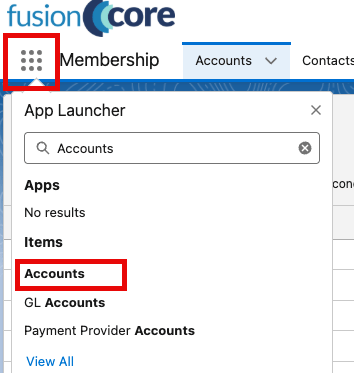
1. Click the **App Launcher** and type `Accounts`.
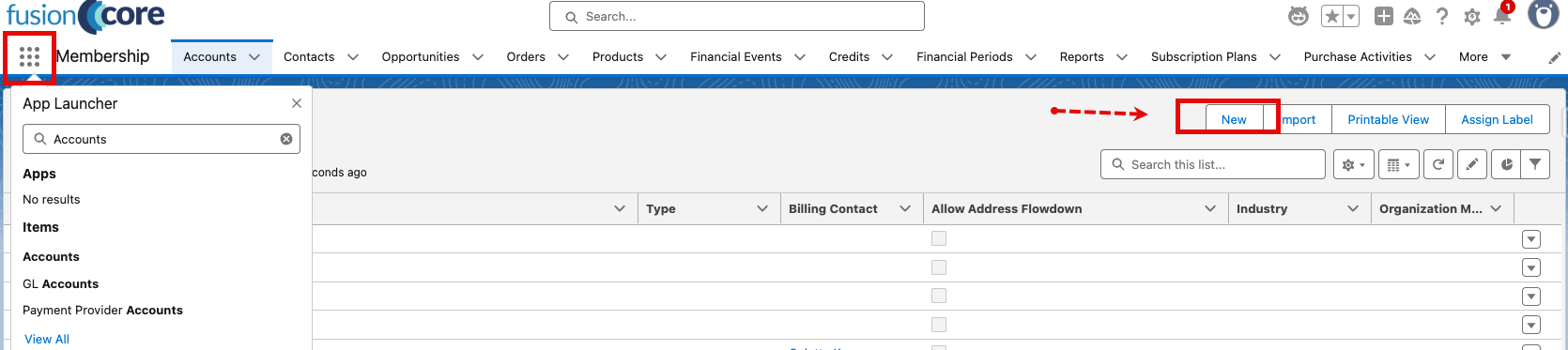
 2. Open **Accounts**, then click **New** at the top right.
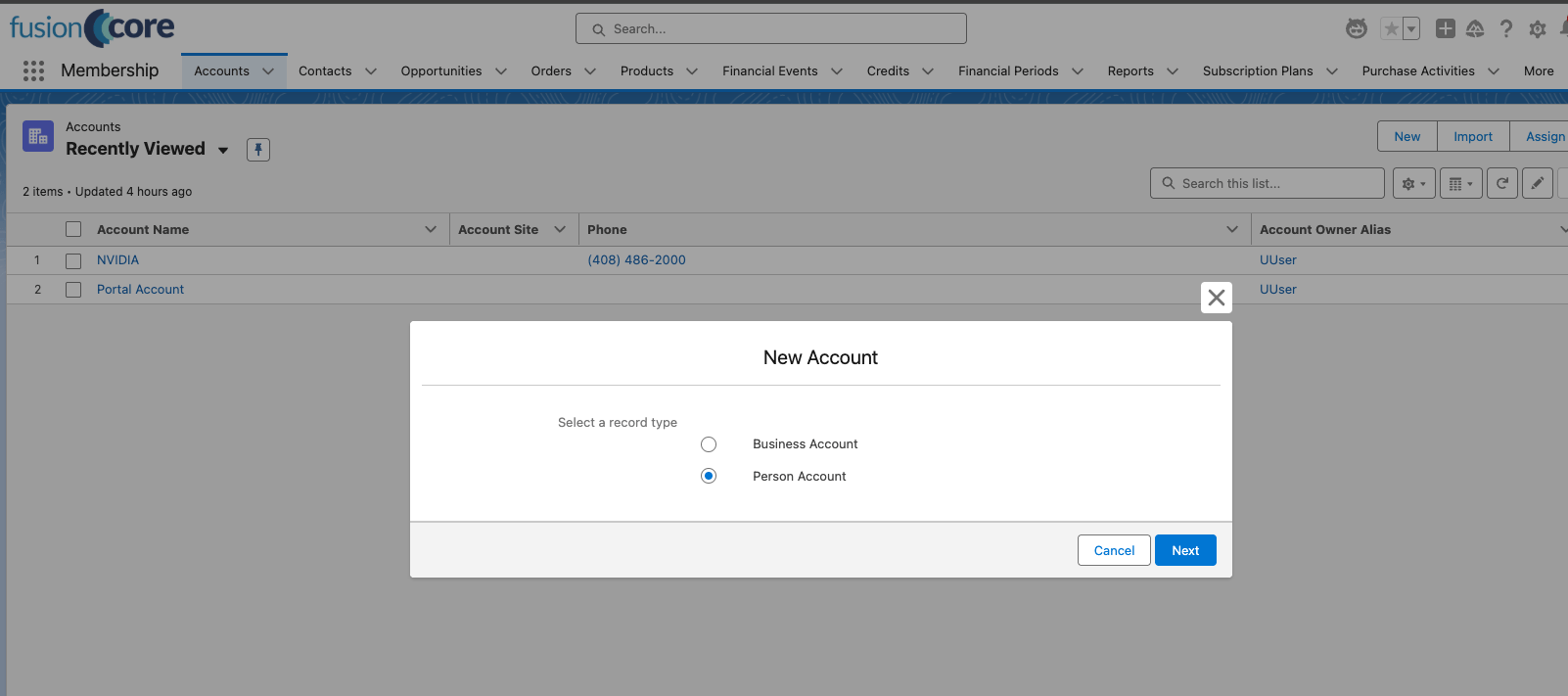
 3. Choose the **Person Account** record type, then click **Next**. This tells Salesforce to create an individual rather than an organization.
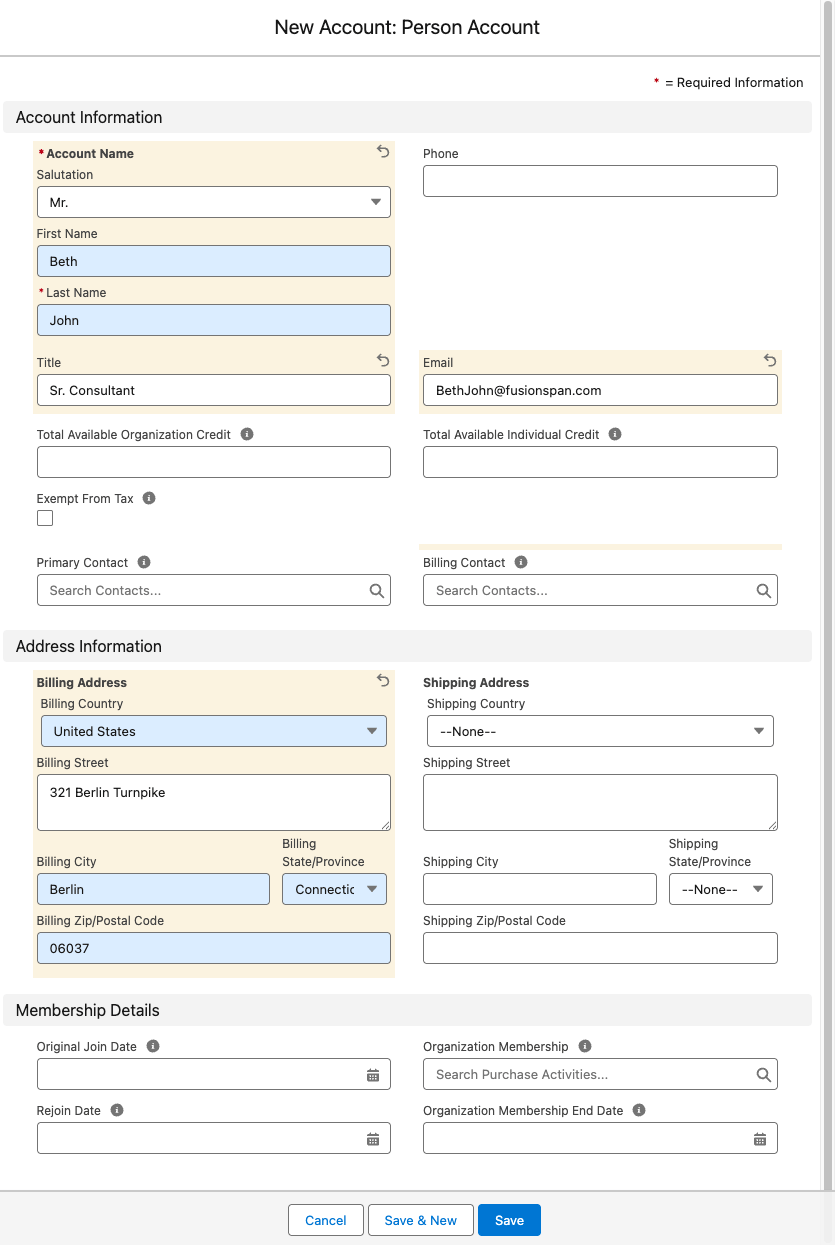
 4. Fill out the Person Account details. The fields below are the most important ones.
| Field | What to enter |
| ------------------------------------------- | --------------------------------------------------------------------------------------------------------------------- |
| **First Name** | The individual's first name. |
| **Last Name** | Required. The individual's last name. |
| **Email** | The individual's email, used for communications and portal access (for example, `jordan.lee@example.com`). |
| **Billing Address** | The street, city, state, ZIP, and country (for example, `401 N Washington St, Suite 400, Rockville, Maryland 20850`). |
| **Exempt From Tax** | Check this only if the individual qualifies for tax exemption. |
| **Primary Contact** and **Billing Contact** | Leave both blank. fusionCore fills them in automatically once you save. |
4. Fill out the Person Account details. The fields below are the most important ones.
| Field | What to enter |
| ------------------------------------------- | --------------------------------------------------------------------------------------------------------------------- |
| **First Name** | The individual's first name. |
| **Last Name** | Required. The individual's last name. |
| **Email** | The individual's email, used for communications and portal access (for example, `jordan.lee@example.com`). |
| **Billing Address** | The street, city, state, ZIP, and country (for example, `401 N Washington St, Suite 400, Rockville, Maryland 20850`). |
| **Exempt From Tax** | Check this only if the individual qualifies for tax exemption. |
| **Primary Contact** and **Billing Contact** | Leave both blank. fusionCore fills them in automatically once you save. |
 5. Click **Save** at the bottom of the page.
After you save, fusionCore populates **Primary Contact** and **Billing Contact** from the person's own contact record. You do not need to see or edit these fields — the automation runs in the background and keeps opportunities, orders, refunds, and reports consistent.
### Using Account Address Flowdown with Person Accounts
Account Address Flowdown copies a record's address to its related contacts so you don't re-enter it by hand. To learn how it works with Person Accounts, see [Using Account Address Flowdown with Person Accounts](/end-user-guides/accounts/person-account-support/using-account-address-flowdown-with-person-accounts).
## Limitations and Common Pitfalls
Keep these in mind when you work with Person Accounts.
Enabling Person Accounts is permanent and cannot be undone. Plan before you turn the feature on. See [Enable Person Accounts](/end-user-guides/accounts/person-account-support/person-account-set-up/index#enable-person-accounts) for the full warning and the confirmation steps.
* **Automatic address flow down does not apply to a Person Account.** A Person Account has no separate child Contact for the address to copy to, so the automatic sync skips it. To keep its addresses aligned, use the manual **Sync Address Details** button instead. See [Using Account Address Flowdown with Person Accounts](/end-user-guides/accounts/person-account-support/using-account-address-flowdown-with-person-accounts).
* **A blank Mailing Address is not filled in for you when you create the record.** Saving a new Person Account with an empty Mailing Address does not copy the Billing Address into it today. After you save, use the manual **Sync Address Details** button to populate the Mailing Address.
* **The customer name can show blank or wrong if the layouts are not updated.** fusionCore uses its own **Customer** and **Customer Name** fields to resolve the individual on Order, Credit, and Purchase Activity records. If those fields have not been added to those page layouts in place of the older fields, the customer name can appear blank or incorrect for Person Accounts. Ask your administrator to add the current fusionCore customer fields to those layouts.
## Related Features
Because a Person Account is both an Account and a Contact, these features apply to it the same way they apply to standard records.
The person side of a Person Account, including the Individual membership and credit fields.
Apply credit balances to an individual stored as a Person Account.
5. Click **Save** at the bottom of the page.
After you save, fusionCore populates **Primary Contact** and **Billing Contact** from the person's own contact record. You do not need to see or edit these fields — the automation runs in the background and keeps opportunities, orders, refunds, and reports consistent.
### Using Account Address Flowdown with Person Accounts
Account Address Flowdown copies a record's address to its related contacts so you don't re-enter it by hand. To learn how it works with Person Accounts, see [Using Account Address Flowdown with Person Accounts](/end-user-guides/accounts/person-account-support/using-account-address-flowdown-with-person-accounts).
## Limitations and Common Pitfalls
Keep these in mind when you work with Person Accounts.
Enabling Person Accounts is permanent and cannot be undone. Plan before you turn the feature on. See [Enable Person Accounts](/end-user-guides/accounts/person-account-support/person-account-set-up/index#enable-person-accounts) for the full warning and the confirmation steps.
* **Automatic address flow down does not apply to a Person Account.** A Person Account has no separate child Contact for the address to copy to, so the automatic sync skips it. To keep its addresses aligned, use the manual **Sync Address Details** button instead. See [Using Account Address Flowdown with Person Accounts](/end-user-guides/accounts/person-account-support/using-account-address-flowdown-with-person-accounts).
* **A blank Mailing Address is not filled in for you when you create the record.** Saving a new Person Account with an empty Mailing Address does not copy the Billing Address into it today. After you save, use the manual **Sync Address Details** button to populate the Mailing Address.
* **The customer name can show blank or wrong if the layouts are not updated.** fusionCore uses its own **Customer** and **Customer Name** fields to resolve the individual on Order, Credit, and Purchase Activity records. If those fields have not been added to those page layouts in place of the older fields, the customer name can appear blank or incorrect for Person Accounts. Ask your administrator to add the current fusionCore customer fields to those layouts.
## Related Features
Because a Person Account is both an Account and a Contact, these features apply to it the same way they apply to standard records.
The person side of a Person Account, including the Individual membership and credit fields.
Apply credit balances to an individual stored as a Person Account.