> ## Documentation Index
> Fetch the complete documentation index at: https://docs.fusioncore.us/llms.txt
> Use this file to discover all available pages before exploring further.
# Contacts
> Create and manage Contacts in fusionCore, and understand the fusionCore fields that appear on the Contact record.
## Overview
In fusionCore, Contacts are the people associated with an Account. They can represent:
* Staff or employees of a corporate member.
* Individual members, set up as Person Accounts (if enabled).
* Sponsors, donors, or volunteers associated with an organization.
A Contact holds person-specific details, such as job title, event participation, and donation history, and lets you tailor your communication and engagement with that person.
A Contact does not have to be linked to an Account. However, a Contact with no Account cannot create Orders through fusionCore automation, because that automation requires an Account.
You can set up validations that require every Contact to have an Account, depending on the needs of your organization.
## How to Create a Contact
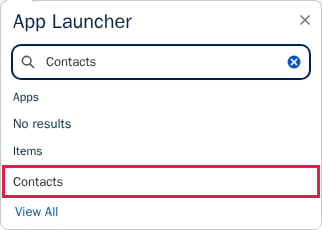
Click the **App Launcher**, type `Contacts`, then click **Contacts**.
 Click **New** in the top-right corner.
Enter the **Contact Information**. **Last Name** is required. Fill out any other fields you have information for.
Click **New** in the top-right corner.
Enter the **Contact Information**. **Last Name** is required. Fill out any other fields you have information for.
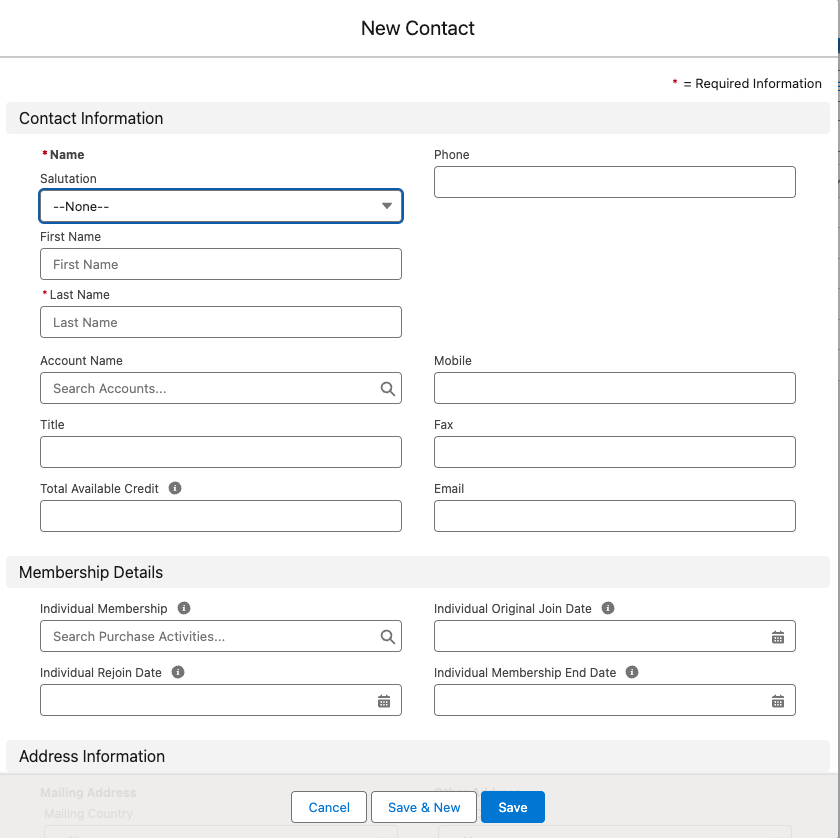 Click **Save**.
## fusionCore Fields on the Contact
fusionCore adds the following fields to the Contact record. The field labels include the word "Individual". The API names below include the package prefix (`FCORE_PAY__` for Commerce fields and `FCORE_MEM__` for Subscriptions fields).
| Field | API name | Purpose |
| --------------------------------- | ---------------------------------------------- | --------------------------------------------------------------------------------------------------------------------------------------------------------- |
| Total Available Individual Credit | `FCORE_PAY__Total_Available_Credit__c` | The total available credit, summed from the Contact's Individual-type Credit records. |
| Individual Exempt from Tax | `FCORE_PAY__Individual_Exempt_From_Tax__c` | When checked, excludes the Contact from tax on opportunities or orders. |
| Individual Membership | `FCORE_MEM__Individual_Membership__c` | Lookup to the current individual membership Purchase Activity. Auto-populated. |
| Individual Membership End Date | `FCORE_MEM__Individual_Membership_End_Date__c` | The furthest paid-through date for the individual membership, excluding the grace period. Auto-populated. |
| Individual Original Join Date | `FCORE_MEM__Individual_Original_Join_Date__c` | The Contact's first join date. Auto-populated. |
| Individual Rejoin Date | `FCORE_MEM__Individual_Rejoin_Date__c` | The membership rejoin date for the Contact. Auto-populated when a lapsed membership is renewed. |
| Benefit | `FCORE_PAY__Benefit__c` | The current active benefit, or the last active benefit assigned. Only appears if the Sync Benefit to Contact field on the related Product is set to true. |
The Individual membership, join date, rejoin date, end date, and membership lookup fields are populated automatically. Do not edit them by hand — fusionCore overwrites any value you type in with the value it calculates, so your manual change will not stick.
You can read more about the membership fields on the Contact [here](/end-user-guides/subscriptions/membership-info-on-account-contact).
## Related Features
Once you can create and read Contacts, these features explain the data that flows onto them and the ways a Contact can be used.
How an Account's Billing Address flows down to a related Contact's Mailing Address.
When a Contact is an individual member, stored as a combined Account and Contact in one Person Account record.
What populates the Individual Membership and credit fields you see on the Contact.
Click **Save**.
## fusionCore Fields on the Contact
fusionCore adds the following fields to the Contact record. The field labels include the word "Individual". The API names below include the package prefix (`FCORE_PAY__` for Commerce fields and `FCORE_MEM__` for Subscriptions fields).
| Field | API name | Purpose |
| --------------------------------- | ---------------------------------------------- | --------------------------------------------------------------------------------------------------------------------------------------------------------- |
| Total Available Individual Credit | `FCORE_PAY__Total_Available_Credit__c` | The total available credit, summed from the Contact's Individual-type Credit records. |
| Individual Exempt from Tax | `FCORE_PAY__Individual_Exempt_From_Tax__c` | When checked, excludes the Contact from tax on opportunities or orders. |
| Individual Membership | `FCORE_MEM__Individual_Membership__c` | Lookup to the current individual membership Purchase Activity. Auto-populated. |
| Individual Membership End Date | `FCORE_MEM__Individual_Membership_End_Date__c` | The furthest paid-through date for the individual membership, excluding the grace period. Auto-populated. |
| Individual Original Join Date | `FCORE_MEM__Individual_Original_Join_Date__c` | The Contact's first join date. Auto-populated. |
| Individual Rejoin Date | `FCORE_MEM__Individual_Rejoin_Date__c` | The membership rejoin date for the Contact. Auto-populated when a lapsed membership is renewed. |
| Benefit | `FCORE_PAY__Benefit__c` | The current active benefit, or the last active benefit assigned. Only appears if the Sync Benefit to Contact field on the related Product is set to true. |
The Individual membership, join date, rejoin date, end date, and membership lookup fields are populated automatically. Do not edit them by hand — fusionCore overwrites any value you type in with the value it calculates, so your manual change will not stick.
You can read more about the membership fields on the Contact [here](/end-user-guides/subscriptions/membership-info-on-account-contact).
## Related Features
Once you can create and read Contacts, these features explain the data that flows onto them and the ways a Contact can be used.
How an Account's Billing Address flows down to a related Contact's Mailing Address.
When a Contact is an individual member, stored as a combined Account and Contact in one Person Account record.
What populates the Individual Membership and credit fields you see on the Contact.