> ## Documentation Index
> Fetch the complete documentation index at: https://docs.fusioncore.us/llms.txt
> Use this file to discover all available pages before exploring further.
# Community Member
> Add a Contact to a Community as a member, let fusionCore create the matching position, and add further dated roles.
A **Community Member** (`FS_Community_Member__c`) links a **Contact** (a person) to a Community. Adding a member records that the person belongs to the Community and when their involvement started.
For background on the Community feature and the objects it uses, see [Communities](/end-user-guides/accounts/communities/index).
### Before You Start
* The Community already exists. If it does not, [create the Community](/end-user-guides/accounts/communities/index) first.
* The person you want to add already has a **Contact** record.
### Add a Community Member
Open the Community record you want to add a member to.
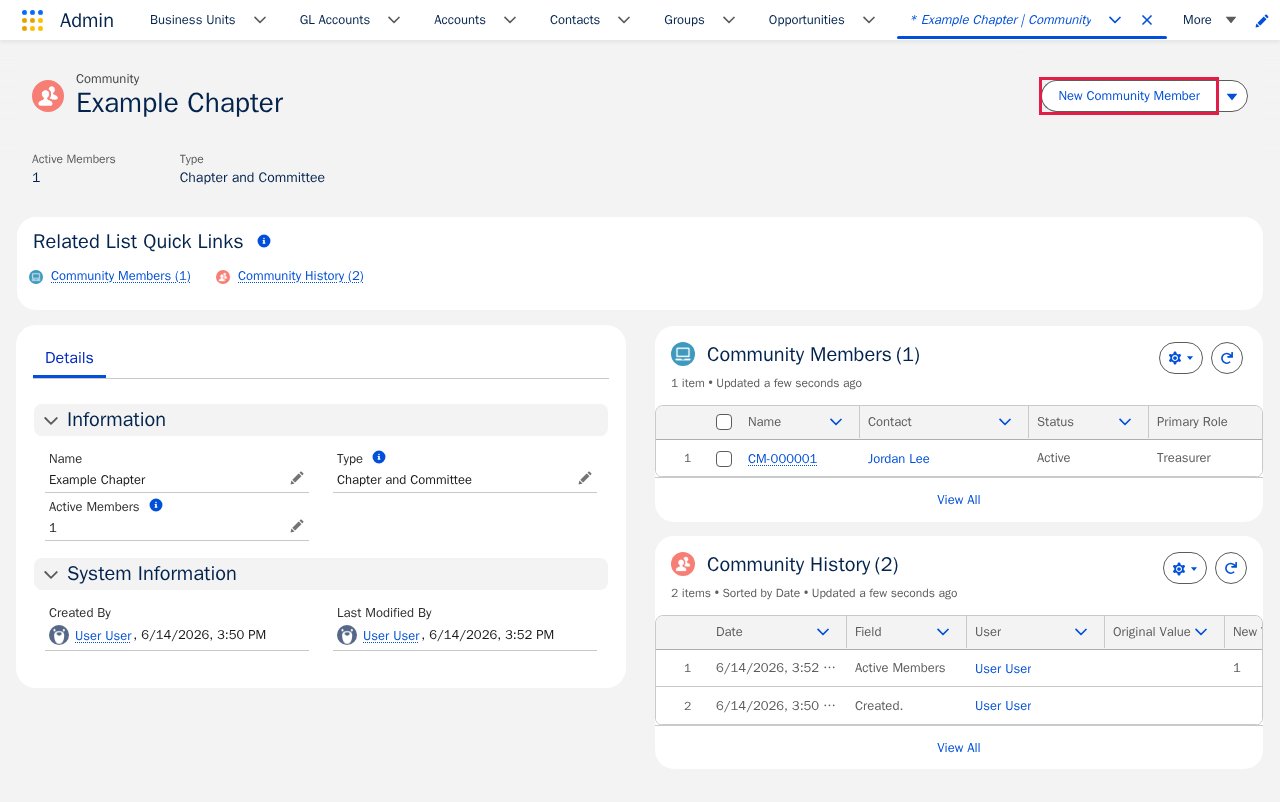
On the Community record, find the **Community Members** related list and click **New Community Member**.
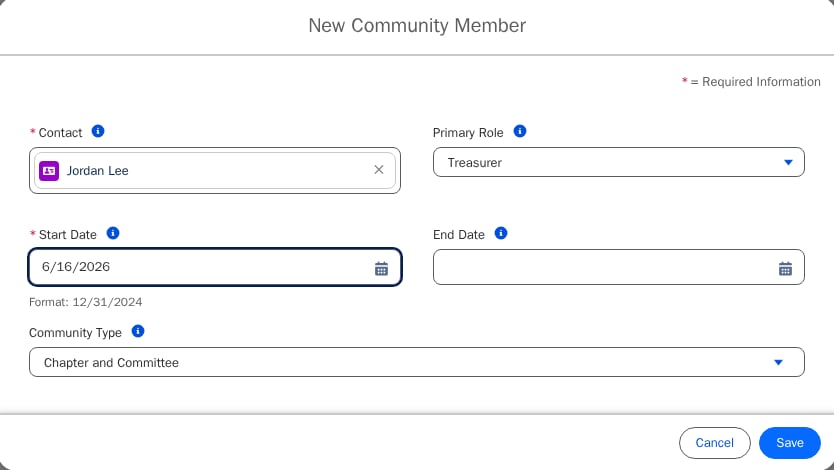
 Complete the form:
* **Contact** (required) — the person you are adding.
* **Start Date** (required) — when the person's involvement begins.
* **Community Type** — read-only; fusionCore fills this in from the Community.
* **Primary Role** (optional) — the role this member holds.
* **End Date** (optional) — when involvement ends. Leave it blank for ongoing (lifetime) membership.
Complete the form:
* **Contact** (required) — the person you are adding.
* **Start Date** (required) — when the person's involvement begins.
* **Community Type** — read-only; fusionCore fills this in from the Community.
* **Primary Role** (optional) — the role this member holds.
* **End Date** (optional) — when involvement ends. Leave it blank for ongoing (lifetime) membership.
 Click **Save**.
When you save, fusionCore automatically creates a matching **Community Position** for the member, using the **Start Date** and **Primary Role** you entered. If you leave **Primary Role** blank, the position is created with the role configured as your org's default (typically **Member**). A position therefore appears even if you did not add one by hand.
* A person can be a member of a given Community only once — fusionCore blocks you from adding the same Contact to the same Community twice.
* Leaving **End Date** blank treats the membership as ongoing (a lifetime membership) until you change it.
### Member Status Is Automatic
The member **Status** — **Active**, **Future**, or **Expired** — is set automatically from the **Start Date** and **End Date**. Do not edit it by hand; let fusionCore calculate it from the dates.
### Community Member Fields Quick Reference
| **Field** | **Purpose** |
| --------------------------- | ------------------------------------------------------------------------------------------------------------------------------------------------------------------ |
| **Community** | Lookup to the Community this member belongs to. Filled in automatically when you add the member from the Community. |
| **Community Type** | The Type of the Community this member belongs to. Filled in automatically from the Community. |
| **Contact** | Lookup to the Contact (the person) this membership is for. |
| **Start Date** | When the member's involvement in the Community begins. |
| **End Date** | When the member's involvement ends. Blank means ongoing (lifetime) membership. |
| **Primary Role** | The role this member holds, used for reporting. Reflects the role that is highest in the role hierarchy. |
| **Status** | The member's current status — **Active**, **Future**, or **Expired**. Set automatically from the dates. |
| **Original Join Date** | When the member first joined the Community. Set automatically from the start date of their first position, and not changed if the member later leaves and rejoins. |
| **Highest Active Position** | Lookup to the member's position whose role is highest in the hierarchy. |
| **Positions** | The positions currently held by this member. |
## Community Position
A **Community Position** (`FS_Community_Position__c`) is a dated role that a Community member holds — for example, Chair, Treasurer, or Member. A single member can hold more than one position over time.
fusionCore usually creates a position for you automatically when you add a Community member, as described above. Follow the steps below when you want to add an additional position.
### Before You Start
* The Community member already exists. If not, [add the member](#add-a-community-member) first.
### Add a Community Position
Open the Community Member record you want to add a position to.
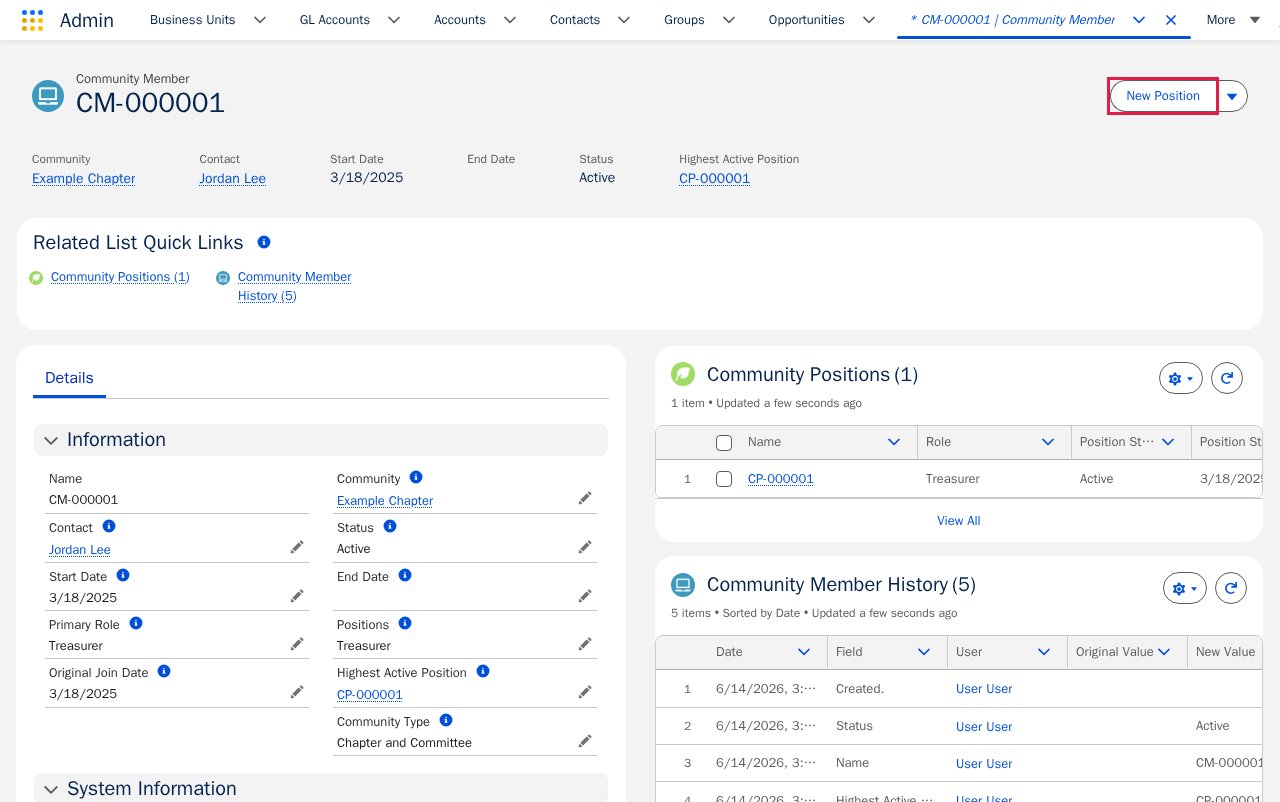
Find the **Community Positions** related list and click **New Position**.
Click **Save**.
When you save, fusionCore automatically creates a matching **Community Position** for the member, using the **Start Date** and **Primary Role** you entered. If you leave **Primary Role** blank, the position is created with the role configured as your org's default (typically **Member**). A position therefore appears even if you did not add one by hand.
* A person can be a member of a given Community only once — fusionCore blocks you from adding the same Contact to the same Community twice.
* Leaving **End Date** blank treats the membership as ongoing (a lifetime membership) until you change it.
### Member Status Is Automatic
The member **Status** — **Active**, **Future**, or **Expired** — is set automatically from the **Start Date** and **End Date**. Do not edit it by hand; let fusionCore calculate it from the dates.
### Community Member Fields Quick Reference
| **Field** | **Purpose** |
| --------------------------- | ------------------------------------------------------------------------------------------------------------------------------------------------------------------ |
| **Community** | Lookup to the Community this member belongs to. Filled in automatically when you add the member from the Community. |
| **Community Type** | The Type of the Community this member belongs to. Filled in automatically from the Community. |
| **Contact** | Lookup to the Contact (the person) this membership is for. |
| **Start Date** | When the member's involvement in the Community begins. |
| **End Date** | When the member's involvement ends. Blank means ongoing (lifetime) membership. |
| **Primary Role** | The role this member holds, used for reporting. Reflects the role that is highest in the role hierarchy. |
| **Status** | The member's current status — **Active**, **Future**, or **Expired**. Set automatically from the dates. |
| **Original Join Date** | When the member first joined the Community. Set automatically from the start date of their first position, and not changed if the member later leaves and rejoins. |
| **Highest Active Position** | Lookup to the member's position whose role is highest in the hierarchy. |
| **Positions** | The positions currently held by this member. |
## Community Position
A **Community Position** (`FS_Community_Position__c`) is a dated role that a Community member holds — for example, Chair, Treasurer, or Member. A single member can hold more than one position over time.
fusionCore usually creates a position for you automatically when you add a Community member, as described above. Follow the steps below when you want to add an additional position.
### Before You Start
* The Community member already exists. If not, [add the member](#add-a-community-member) first.
### Add a Community Position
Open the Community Member record you want to add a position to.
Find the **Community Positions** related list and click **New Position**.
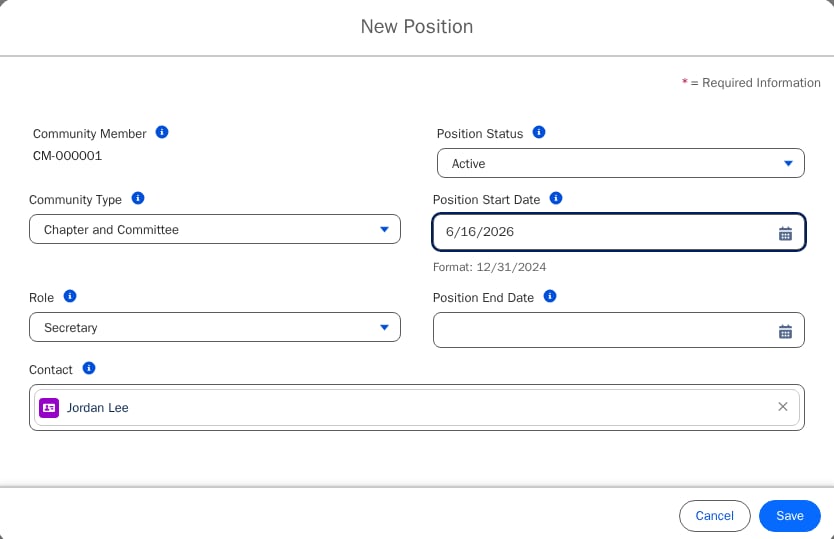
 Complete the form:
* **Role** (required) — the role the member holds. The available values depend on the Community **Type**.
* **Start Date** (required) — when the member begins this role.
* **End Date** (optional) — when the role ends.
Complete the form:
* **Role** (required) — the role the member holds. The available values depend on the Community **Type**.
* **Start Date** (required) — when the member begins this role.
* **End Date** (optional) — when the role ends.
 Click **Save**.
The values in the **Role** picklist depend on the Community **Type**. If you do not see the role you expect, check the Community's Type.
### Position Status Is Automatic
The position **Status** — **Active**, **Future**, or **Expired** — is set automatically from the **Start Date** and **End Date**. You do not need to set it. For example, if both dates are in the future, the status becomes **Future**, even if you tried to set something else when creating the record.
## Limitations and Common Pitfalls
Keep these in mind when you add members and positions. The callouts above also cover two of them: a person can belong to a given Community only once, and saving a member automatically creates a matching Community Position.
* **You cannot save a member without a Community, but you can save one without a Contact.** Community is required, while Contact is not. It is possible to save a member with no person attached, which leaves an empty membership. Always fill in **Contact** before you save.
* **Do not edit Member Status by hand.** As covered in [Member status is automatic](#member-status-is-automatic), the member **Status** is calculated from the **Start Date** and **End Date**. Change the dates to change the status; editing the status directly will not stick.
* **The available Role values depend on the Community Type.** As noted above, the **Role** list on a position is limited by the Community's **Type**. Set the Type on the Community first; otherwise the role you want may not appear. See [Communities](/end-user-guides/accounts/communities/index) for how the Type is set.
* **Do not set Position Status by hand.** As covered in [Position status is automatic](#position-status-is-automatic), the position **Status** is calculated from the **Start Date** and **End Date**. Change the dates to change the status.
## Related Features
A member is always tied to a Contact and belongs to a Community. These guides cover what you need next.
How Communities work and the objects they use. Create a Community here if you don't have one yet.
The person record behind every member. Each Community Member links to a Contact.
{/* Source: https://fusionspan.atlassian.net/wiki/spaces/fcdocs/pages/4843438199/Community+Position */}
Click **Save**.
The values in the **Role** picklist depend on the Community **Type**. If you do not see the role you expect, check the Community's Type.
### Position Status Is Automatic
The position **Status** — **Active**, **Future**, or **Expired** — is set automatically from the **Start Date** and **End Date**. You do not need to set it. For example, if both dates are in the future, the status becomes **Future**, even if you tried to set something else when creating the record.
## Limitations and Common Pitfalls
Keep these in mind when you add members and positions. The callouts above also cover two of them: a person can belong to a given Community only once, and saving a member automatically creates a matching Community Position.
* **You cannot save a member without a Community, but you can save one without a Contact.** Community is required, while Contact is not. It is possible to save a member with no person attached, which leaves an empty membership. Always fill in **Contact** before you save.
* **Do not edit Member Status by hand.** As covered in [Member status is automatic](#member-status-is-automatic), the member **Status** is calculated from the **Start Date** and **End Date**. Change the dates to change the status; editing the status directly will not stick.
* **The available Role values depend on the Community Type.** As noted above, the **Role** list on a position is limited by the Community's **Type**. Set the Type on the Community first; otherwise the role you want may not appear. See [Communities](/end-user-guides/accounts/communities/index) for how the Type is set.
* **Do not set Position Status by hand.** As covered in [Position status is automatic](#position-status-is-automatic), the position **Status** is calculated from the **Start Date** and **End Date**. Change the dates to change the status.
## Related Features
A member is always tied to a Contact and belongs to a Community. These guides cover what you need next.
How Communities work and the objects they use. Create a Community here if you don't have one yet.
The person record behind every member. Each Community Member links to a Contact.
{/* Source: https://fusionspan.atlassian.net/wiki/spaces/fcdocs/pages/4843438199/Community+Position */}