> ## Documentation Index
> Fetch the complete documentation index at: https://docs.fusioncore.us/llms.txt
> Use this file to discover all available pages before exploring further.
# Supported Currencies on Payment Type
> Scope a Payment Type so it only accepts orders in specific currencies.
### Overview
A **Payment Type** is a fusionCore record that represents one way your organization takes money, such as a credit card gateway, ACH bank transfer, cash, or check. In a multi-currency org you may want a Payment Type to accept only certain currencies. For example, an ACH method tied to a US bank should be offered on USD orders but never on a EUR order.
You control this with the **Supported Currencies** field (`Supported_Currencies__c`) on the Payment Type. This field is a multi-select picklist. It accepts these ISO currency codes: AUD, GBP, CAD, EUR, INR, JPY, SGD, AED, and USD.
By default, **Supported Currencies** is blank, which means the Payment Type supports **all** currencies configured in your org. Once you choose one or more currencies, the Payment Type supports **only** those currencies.
### Before You Begin
* Multi-currency must be enabled in your org. See [Enabling Multi-currency](/end-user-guides/accounting/multi-currency/enabling-multi-currency).
* You need edit access to the Payment Type records you want to scope.
Supported Currencies is only enforced in a multi-currency org. In a single-currency org, every Payment Type is treated as valid for the order's currency regardless of this field.
### Define Supported Currencies on a Payment Type
Click the **App Launcher**, type **Payment Type**, and click **Payment Type**.
Open any **Payment Type** record, then edit the **Supported Currencies** field.
Add the currencies you want this Payment Type to accept, then click **Save**. Leave the field blank to keep supporting all currencies.
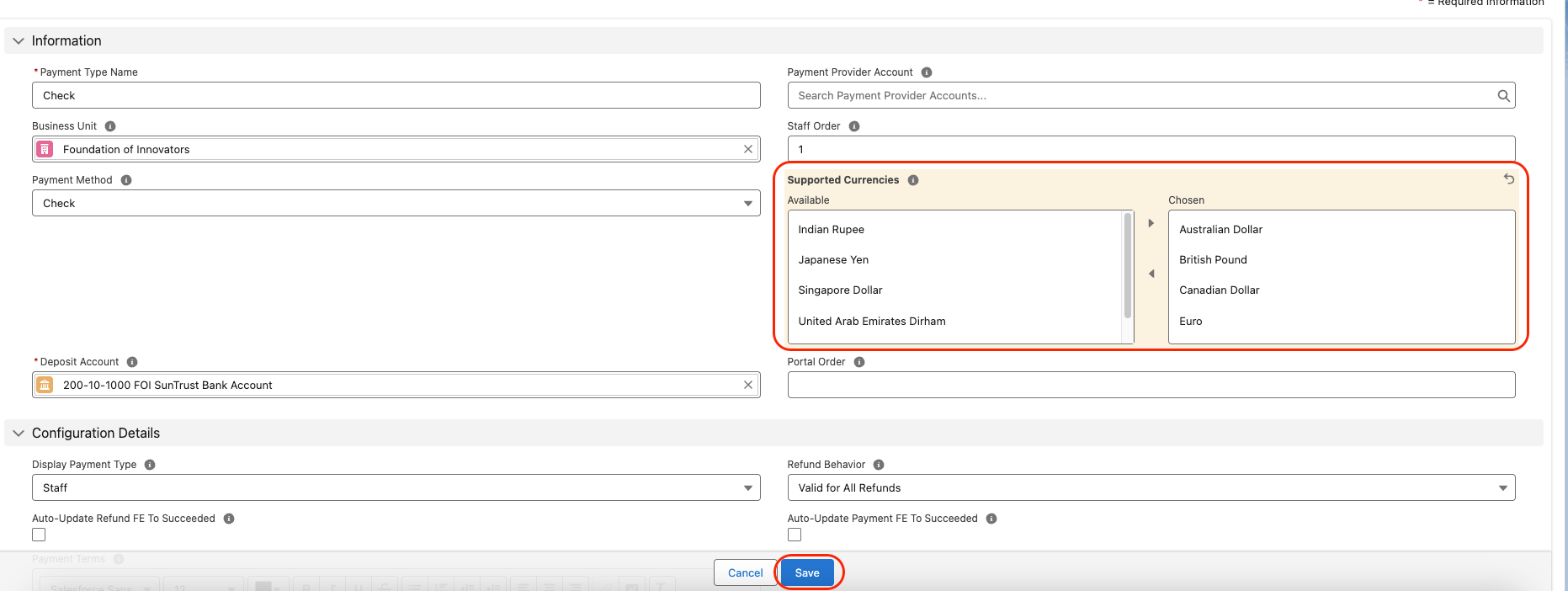 Once you set **Supported Currencies**, the Payment Type supports **only** the chosen currencies. If you leave the field blank, the system assumes the Payment Type is valid for **all** currencies.
### Limitations and Common Pitfalls
* **The picklist is fixed.** **Supported Currencies** only offers the nine ISO codes listed above. A currency you activate in Salesforce but that is not in this list cannot be selected as supported on a Payment Type. Currency matching is case-insensitive.
* **No effect in a single-currency org.** Enforcement only applies when multi-currency is enabled. In a single-currency org the field is ignored and the Payment Type is always considered valid.
* **Blank means all, not none.** A blank field allows every currency. To restrict a Payment Type, you must explicitly choose its currencies.
Once you set **Supported Currencies**, the Payment Type supports **only** the chosen currencies. If you leave the field blank, the system assumes the Payment Type is valid for **all** currencies.
### Limitations and Common Pitfalls
* **The picklist is fixed.** **Supported Currencies** only offers the nine ISO codes listed above. A currency you activate in Salesforce but that is not in this list cannot be selected as supported on a Payment Type. Currency matching is case-insensitive.
* **No effect in a single-currency org.** Enforcement only applies when multi-currency is enabled. In a single-currency org the field is ignored and the Payment Type is always considered valid.
* **Blank means all, not none.** A blank field allows every currency. To restrict a Payment Type, you must explicitly choose its currencies.